AI Silhouette Maker: Turn Any Photo into a Clean SVG Silhouette for Cricut, Laser Cutting & Print
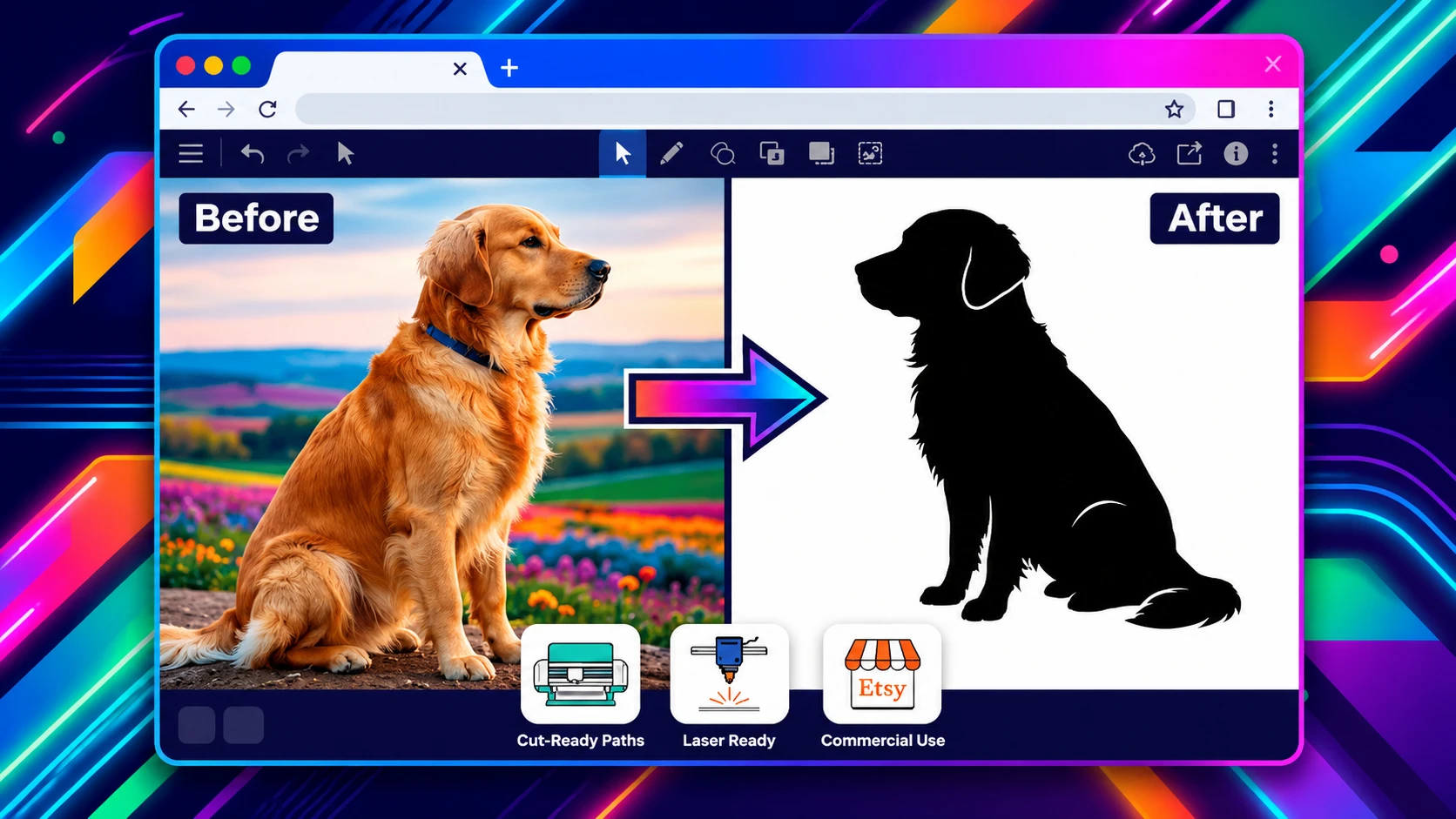
You have a photo, a side profile of a loved one, a pet in a perfect pose, a tree against a bright sky — and you need it as a crisp, single-colour SVG silhouette. Maybe you want to cut it out of vinyl on your Cricut, laser-engrave it onto a wooden sign, create personalised stationery like greeting cards or invitations, or sell digital downloads on Etsy. The old way — removing the background in Photoshop, tracing edges in Illustrator, cleaning up dozens of messy anchor points — can easily eat an hour per image.
SVGMaker's photo to SVG silhouette maker changes that entirely. You upload a photo, the AI identifies the subject, strips the background, and traces the outer shape into smooth, closed vector paths. In seconds, you get a true SVG silhouette — not a pixel-based imitation — ready for cutting, engraving, printing, and any project that demands a clean, scalable shape.
What Is a Photo to SVG Silhouette?
A silhouette is the solid, filled shape of a subject, just the outline, no internal details. Think of the shadow your profile casts on a wall. An SVG silhouette is that shape stored as mathematical paths. It stays sharp at any size, from a tiny sticker to a giant wall decal.
A photo to SVG conversion turns a regular pixel image into this kind of vector file. Unlike a PNG silhouette (which is trapped at one size and one colour), an SVG silhouette is a master asset. You can change its colour with a single hex code, scale it to billboard size without a hint of blur, and send it directly to a cutting machine or laser engraver.
Why Convert a Photo to SVG Silhouette?
| Aspect | PNG / JPG Silhouette | SVG Silhouette |
|---|---|---|
| Scalability | Pixelates when enlarged | Perfect at every size |
| File size | 50–200 KB (per size) | 2–10 KB (one file for all sizes) |
| Editability | Re-colour only in image editors | Change fill colour instantly, any time |
| Cutting (Cricut, Silhouette) | Cannot be used | Cut-ready closed vector paths |
| Laser engraving | Cannot be used | Works directly with Glowforge, xTool, CO₂ lasers |
| Web use | Fixed colour | Colour controlled by CSS (light/dark mode) |
A PNG silhouette is a dead-end. An SVG silhouette is a starting point for dozens of uses and thanks to its universal compatibility, it opens up a world of creative products and side-income opportunities.
How SVGMaker's Photo to SVG Silhouette Maker Works
SVGMaker's AI is not a brightness-threshold filter that simply turns dark pixels black. It actually looks at your photo, understands which part is the subject, separates it from the background, and generates a clean vector outline with smooth Bezier curves.
Step 1: Choose the Right Photo
The AI works with any photo, but a few simple choices give you the cleanest photo to SVG silhouette:
- Clear subject separation — the more distinct the edge between the subject and the background, the smoother the outline will be.
- High contrast — a dark subject on a light background (or vice versa) gives the AI strong visual clues.
- One main subject — single person, one animal, one object. Multiple overlapping subjects may merge into one shape.
- Side profiles for portraits — side views of faces are far more recognisable as silhouettes than front-facing shots.
- Full body for pets and people — a complete standing or sitting shape is far more distinctive than a close-up head.
If the original photo has a busy background, you don't need to leave the tool. SVGMaker can remove the background as part of the conversion. If you want to separate those steps, you can use the dedicated Background Remover first.
Step 2: Upload Your Photo
Go to SVGMaker's converter and drop your photo. The AI immediately:
- Detects the subject (person, pet, object) and separates it from the background.
- Traces the outer contour into smooth vector paths with minimal anchor points.
- Fills the inside as a solid silhouette — by default black, but you can change the colour later.
The whole process takes seconds. There are no thresholds to adjust, no sliders to guess with, and no manual selection to draw.
Step 3: Preview and Refine
SVGMaker shows the original photo next to the new SVG silhouette. At a glance, you can check:
- Does the edge follow the subject accurately?
- Are there any stray fragments that shouldn't be there?
- Are fine details (fur edges, hair, thin branches) handled cleanly?
If anything needs tweaking, use the AI editor directly on the silhouette:
- "Remove the small speck at the bottom."
- "Smooth out the jagged edge on the left."
- "Fill in the small gap near the ear."
- "Simplify the hair area to have fewer anchor points."
Every command keeps the file as a real SVG, ready for any production workflow. And you don't need specialised software for these touch-ups — the SVGMaker SVG editor handles everything in the browser, just as easily as opening the file in Adobe Illustrator, CorelDRAW, Affinity Designer, Inkscape, or Sketch.
Step 4: Download and Use
Download your SVG silhouette. It is immediately usable in Cricut Design Space, Silhouette Studio, Glowforge, xTool, LightBurn, and any design or print software that supports SVG.
From Photo to SVG Silhouette: Creative Use Cases
A single SVG silhouette can power an incredible variety of projects — both for personal enjoyment and for sale.
Personalised Gifts and Stationery
Use your silhouette to create personalized greeting cards, wedding invitations, and envelope liners. Add it to custom phone cases or laptop sleeves. Turn it into a car decal or fridge magnet, or print it onto sports and fitness gear like water bottles, gym bags, and yoga mats. The SVG's infinite scalability means the design looks just as sharp on a small sticker as it does on a full-size tote bag.
Home and Business Branding
Produce consistent logos, window vinyl, and packaging graphics. A silhouette extracted from a product photo can become the hero element of your entire visual identity, staying crisp on everything from a tiny tag to a large storefront sign.
Web and Digital Use
An SVG silhouette is lightweight and CSS-controllable. Use it as a website icon, loading state placeholder, or a centrepiece of a minimalist landing page. It automatically adapts to light and dark mode with a single CSS variable.
Your Silhouette SVG Works Everywhere You Do
Because the output is a standard SVG, you aren't locked into one ecosystem. You can open and edit your silhouette in any professional design software, including:
- Adobe Illustrator
- CorelDRAW
- Adobe Photoshop
- Inkscape
- Sketch
- Affinity Designer
- Gravit Designer
- Sketchbook
- Cricut Design Space
- Silhouette Studio
- Microsoft PowerPoint (yes, you can drop an SVG right into a slide)
And for the fastest possible edits — change a colour, remove a fragment, or tweak the shape. The SVGMaker free SVG path editor is always there, directly in your browser. No downloads, no subscription, just instant vector refinement.
Selling Silhouette SVGs Online (And Earning Real Income)
Silhouette SVG files are one of the most popular digital products on craft and design marketplaces. Because SVGMaker produces true vector files from a simple photo to SVG conversion, you can create large bundles efficiently and sell them for passive income.
Where to sell your SVG silhouettes as downloadable digital files:
- Etsy
- Design Bundles
- Creative Market
- GraphicRiver
- SoFontsy
- Design Cuts
- Society6
- Redbubble
- Gumroad
- 99designs
- ArtStation
- Shutterstock
- Adobe Stock
You can also use your silhouette SVGs for Print-On-Demand physical merchandise without ever holding inventory. Upload the design to platforms like:
- Redbubble (stickers, t-shirts, mugs, phone cases)
- Spreadshirt
- Printify
- Printful
- Zazzle
- Spring (formerly Teespring)
Each sale earns you a royalty, and the platform handles the printing, shipping, and customer service. A single silhouette, created in seconds, can generate income across dozens of products on multiple platforms — that's the power of owning the vector master.
Editing Your Silhouette After Conversion
SVGMaker's AI SVG Vector Graphics editor does much more than just create the initial shape. From the same interface, you can:
- Change the colour: "Change the silhouette to white", or "Change to navy blue #1E3A5F". The silhouette is no longer locked to black.
- Add a background shape: "Place the silhouette inside a circle", or "Put a heart shape behind the subject." This creates a finished badge-style design without leaving the browser.
- Combine silhouettes: "Add a second smaller deer silhouette to the right," or "Place birds above the tree."
- Create an outline version: "Remove fill, keep only a 2px black stroke." Ideal for embroidery patterns, engraving, or colouring-page designs.
- Make a stencil: "Add stencil bridges to all enclosed shapes." This connects the inner parts of letters or shapes to the outer frame so the stencil doesn't fall apart when physically cut.
Every variation stays a clean, lightweight SVG, ready to be opened in any of the professional tools mentioned above — or simply uploaded straight to your Etsy shop or POD platform.
SVG Silhouettes for Cricut, Silhouette Studio, and Vinyl Cutting
SVGMaker's AI guarantees that every silhouette is a closed vector path — exactly what Cricut and Silhouette machines expect. There are no broken lines, no double-cut overlaps, and no stray fragments that confuse Design Space. Upload your file, choose your material size, and cut.
For crafters who want a deeper walkthrough, our guide on the best SVG converter with AI for Cricut, Silhouette, and web covers material-specific tips, multi-layer vinyl preparation, and troubleshooting common import issues.
A few popular projects:
- Single-colour HTV t-shirts with a pet silhouette
- Personalised tote bags with a family portrait outline
- Car window decals of a favourite animal breed
- Layered multi-colour designs with a silhouette on a coloured background circle
Laser Cutting and Engraving Silhouettes
SVG silhouettes translate perfectly to laser work. Filled areas engrave, stroke paths cut, and the smooth curves require no node cleanup. Use them for:
- Wooden signs — engrave a tree silhouette or a couple's portrait on pine or walnut.
- Acrylic night lights — a clean silhouette backlit by an LED base looks striking.
- Leather keychains — engrave a small silhouette of a pet or an initial.
- Ornaments — cut delicate silhouette shapes from thin plywood or acrylic.
The same SVG works with Glowforge, xTool, and any CO₂ laser running LightBurn. If your machine needs DXF format, SVGMaker's SVG to DXF converter online can export a perfect DXF from your SVG without re-tracing.
FAQs
1: How do I turn a photo into an SVG silhouette for free?
A: Upload your photo to SVGMaker's photo to SVG converter. The AI extracts the subject, removes the background, and generates a clean, filled vector silhouette. Free daily credits let you create and download silhouettes without a subscription.
2: Will a photo to SVG silhouette work with my Cricut?
A: Yes. The SVG file contains closed paths, so Cricut Design Space and Silhouette Studio read it as a cuttable layer immediately. No manual cleanup is needed.
3: What kind of photo makes the best silhouette?
A: Photos with a clear, single subject against a contrasting background work best. Side-profile portraits, full-body pet shots, and objects with distinctive outlines all produce sharp, recognisable silhouettes.
4: Can I convert a group photo into a single silhouette?
A: It's better to convert each person or pet individually and then combine the silhouettes using the AI editor or any vector software like Adobe Illustrator or the SVGMaker SVG editor. A group photo converted all at once may merge subjects into one blob.
5: What software can I use to edit my SVG silhouette later?
A: You can use the SVGMaker SVG editor for immediate browser-based changes, or open the file in Adobe Illustrator, CorelDRAW, Affinity Designer, Inkscape, Sketch, Gravit Designer, Sketchbook, or even Microsoft PowerPoint. The standard SVG format works with them all.
6: Can I sell silhouettes I create with SVGMaker?
A: Absolutely. You keep full commercial rights to any silhouette you create. Upload them to Etsy, Design Bundles, Creative Market, Shutterstock, or any other marketplace, or use them on Print-On-Demand products through Redbubble, Printful, Printify, Zazzle, Spreadshirt, or Spring to create physical merchandise that's printed and shipped on demand.
Conclusion
Don't spend an hour manually tracing and cleaning paths. Upload your photo to SVGMaker's photo to SVG converter, and in seconds you'll have a clean, scalable vector silhouette — ready for Cricut, laser engraving, custom stationery, phone cases, fitness gear, and every marketplace from Etsy to Redbubble.
Fine-tune your silhouette instantly with the SVGMaker online SVG editor, then open it in the professional software you already trust, or upload it straight to your shop. One photo. One silhouette. Endless creative and commercial possibilities.
