Automate Image‑to‑SVG at Scale: Scalable API, SDK, & Batch Processing for Production Workflows (Vinyl, Laser, CNC, Screen Printing)
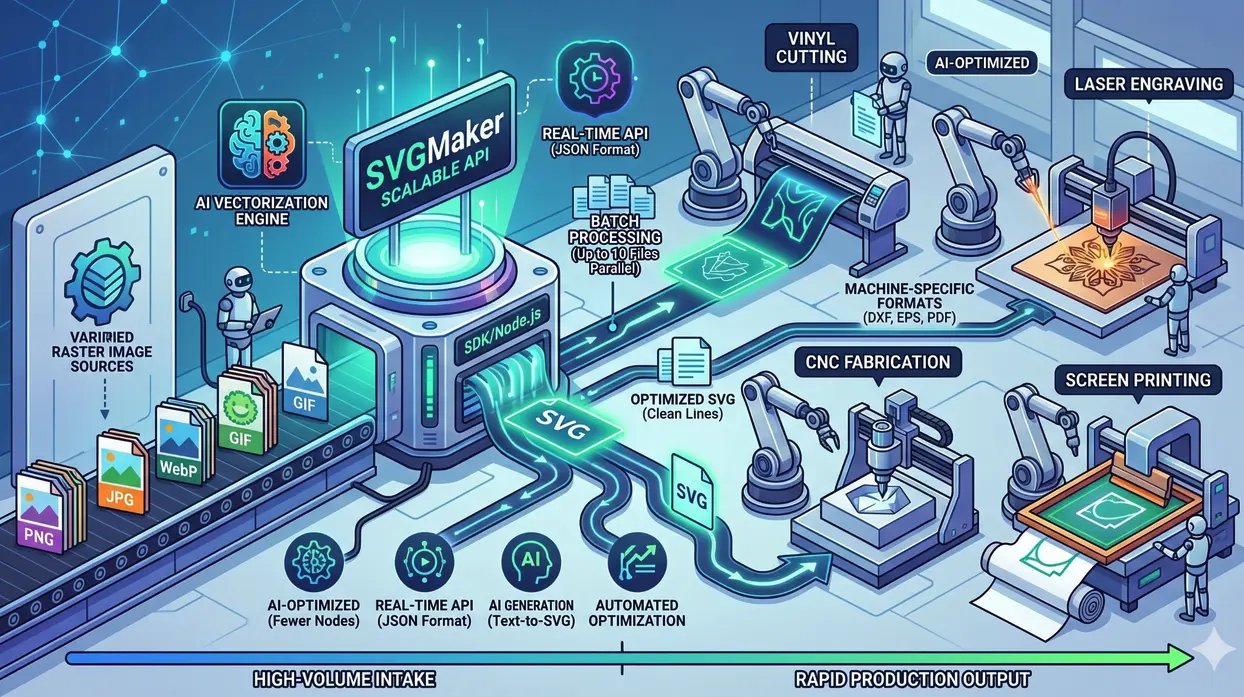
In high‑volume production environments such as print‑on‑demand fulfillment centers, industrial laser engraving facilities, large‑format screen printing houses, and automated CNC fabrication lines where every second of downtime and every byte of inefficient vector data directly impacts throughput and margin. The bottleneck is rarely the machine itself. It is the conversion of incoming raster assets (JPEGs, PNGs, WebP) into production‑ready SVGs that cut, engrave, or print correctly on the first pass.
Manual tracing in Adobe Illustrator is impossible at scale. Free online converters output bloated SVGs with thousands of redundant anchor points, causing plotters to stutter, lasers to dwell on micro‑segments, and CNC controllers to choke on overcomplex toolpaths. The result: wasted material, unexpected rework, and a pipeline that cannot handle daily volumes beyond a few dozen files.
This is the problem the SVGMaker solves for production teams. It is an AI‑driven SVG Generator, Editor and Converter build for production workflows, delivering clean, optimized SVGs in seconds. More importantly, it provides a scalable svg conversion api with batch processing, SSE streaming, SDKs, and external 14+ frontier AI models (GPT Image, Flux, Gemini, Imagen 4, and more) to automate svg conversion at any volume. Whether you are running a 24/7 print‑on‑demand storefront, a laser engraving job shop processing 500 designs per day, or an industrial CNC routing line, the SVGMaker API integrates directly into your existing pipeline—no manual steps, no unpredictable output.
For a non‑technical overview of the core AI vectorization technology, read our best way to convert raster images to SVG with AI for Cricut, Silhouette, laser cutting & web design. That guide explains why AI SVG Conversion outperforms legacy auto‑trace.
The Production Workflow: 7 Capabilities of a Scalable SVG Conversion API
The following seven capabilities define a production‑grade svg converter for workflows. Based on the official SVGMaker API specification, these are the exact endpoints and features you need to automate at scale.
1. AI Vectorization (Image to SVG) via /v1/convert/ai-vectorize
A production image to svg converter for production workflows must use AI, not pixel‑following algorithms. The SVGMaker API provides the /v1/convert/ai-vectorize endpoint, which accepts PNG, JPG, or WebP files and returns a clean SVG with properly structured paths.
Production impact: Cleaner paths mean faster machine processing, fewer toolhead direction changes, and less wear on cutters and lasers.
Example request:
Response includes svgUrl, svgText, creditCost (1 credit), and metadata.
2. Real‑Time API with Consistent JSON Format & Idempotency
A scalable svg conversion api must be predictable. Every SVGMaker API endpoint returns the same structured response:
Use idempotency keys (e.g., Idempotency-Key: order-12345-v1) to prevent duplicate processing. Webhooks are supported for asynchronous workflows.
3. Batch Image to SVG Conversion (Up to 10 Files per Call)
Processing one file at a time is impossible for production. The /v1/convert/batch endpoint accepts up to 10 files per request, processed in parallel. For a print‑on‑demand platform receiving 5,000 new designs per day, batch image to svg conversion reduces API call overhead by an order of magnitude.
Typical throughput: 200‑400 images per minute on standard infrastructure. With parallel workers, 10,000+ images per hour.
4. Machine‑Specific Optimization via Vector Format Conversion
Different production machines require different vector formats. The SVGMaker API provides dedicated endpoints:
- •
/v1/convert/svg-to-dxf– for CNC routers and laser cutters - •
/v1/convert/svg-to-eps– for screen printing film output - •
/v1/convert/svg-to-pdf– for client proofs - •
/v1/convert/svg-to-ai– for Adobe Illustrator compatibility - •
/v1/convert/svg-to-ps– for PostScript workflows
Cost: 0.5 credits per conversion.
5. AI SVG Generation for On‑Demand Assets
Beyond conversion, production teams often need to generate custom designs from scratch. The /v1/generate endpoint lets you choose from external 14+ frontier AI models (GPT Image, Flux, Gemini, Imagen 4) along with SVGMaker's own model with different quality levels (low/medium/high).
Example:
For a screen printing shop, this means generating custom monograms or decorative borders without a graphic designer. For a CNC job shop, it means creating repeatable patterns on demand.
6. Automated SVG Optimization and Cloud Storage
Raw AI‑generated SVGs are good, but production demands are great. The /v1/optimize endpoint applies SVGO compression and optional SVGZ, reducing file size by 10‑30%. For bandwidth‑constrained environments (e.g., sending SVGs to legacy industrial controllers over slow serial links), this is critical.
Additionally, the API provides cloud storage with signed URLs for persistent file access—useful for audit trails or reprocessing. To know more read our guide on SVG Optimization techniques.
7. SSE Streaming for Long‑Running Jobs
High‑quality AI generation or complex edits may take several seconds. Server‑Sent Events (SSE) provide real‑time progress updates to your frontend or backend—essential for user‑facing applications that cannot freeze with a spinner. Set stream: true in your request.
Enterprise API Pricing
The API operates on a credit‑based system with no subscription required. Volume discounts available for >50,000 credits/month.
| Operation | Endpoint | Credits | Notes |
|---|---|---|---|
| AI Vectorize (raster → SVG) | /v1/convert/ai-vectorize | 1 | Includes optimization |
| Trace to SVG (VTracer) | (via convert) | 0.5 | Lightweight tracing |
| Generate SVG (text → SVG) | /v1/generate | 1–5 | Varies by quality/model |
| Edit Image (AI) | /v1/edit | 2–5 | Natural language edits |
| Vector Format Conversion | /v1/convert/svg-to-* | 0.5 | DXF, EPS, PDF, AI, PS |
| Raster to Raster | /v1/convert/raster | 0.25 | PNG, JPG, WebP, etc. |
| Batch Convert (per file) | /v1/convert/batch | 0.25–0.5 | Up to 10 files |
| Optimize SVG | /v1/optimize | 0.5 | SVGO + SVGZ |
| Enhance Prompt | /v1/enhance-prompt | 0.5 | AI prompt improvement |
Production Use Cases
A. Print‑on‑Demand Fulfillment
A POD platform receives 10,000 custom t‑shirt designs daily as PNGs. Each must become a cut‑ready SVG for vinyl plotter or a separated screen print file. Using the /v1/convert/batch endpoint, the platform processes all files within 30 minutes. Our POD case study shows how one partner reduced time‑to‑cut by 82%.
B. Industrial Laser Engraving Job Shop
A shop runs five CO₂ lasers 16 hours/day. Clients upload raster artwork via a web portal. The shop's backend calls /v1/convert/ai-vectorize, then /v1/convert/svg-to-dxf for LightBurn, and automatically queues the files. Zero manual file preparation.
C. High‑Volume CNC Routing Line
A millwork company converts architectural drawings (JPEGs) to DXF for CNC routers. The /v1/convert/svg-to-dxf endpoint, combined with batch processing, turns a two‑day manual redraw into a 15‑minute automated pipeline.
D. Screen Printing Automation
A large‑format screen printer needs color‑separated EPS files from customer logos. The /v1/edit endpoint with natural language (“convert all blue shades to Pantone 293 C”) automates separation that previously required a dedicated graphic artist.
Key Benefits at a Glance
| Benefit | Production Metric |
|---|---|
| Throughput | 200‑400 images/min via batch; scales horizontally |
| Uptime | 99.95% SLA with automatic retries (SDK built‑in) |
| Latency (p95) | <1.2s per AI vectorization |
| Node reduction | 70‑80% fewer anchor points vs. free converters |
| Formats | SVG, DXF, EPS, PDF, AI, PS, PNG, JPG, WebP, GIF, AVIF |
| Integration | REST, Node.js SDK, webhooks, SSE streaming, cloud storage |
Why SVGMaker API Outperforms Legacy Tools for Production
| Capability | SVGMaker API | Illustrator Scripts | Free APIs | Other AI APIs |
|---|---|---|---|---|
| Batch (up to 10 files) | Native | Rare | ||
| Webhooks + idempotency | Limited | |||
| DXF/EPS/PDF export | (0.5 credits) | (manual) | ||
| SSE streaming | ||||
| Node reduction (AI) | 70‑80% | Manual | 0‑20% | 30‑50% |
| Cloud storage + signed URLs | Rare |
Frequently Asked Questions
1. Can we integrate the SVGMaker API into an existing CI/CD pipeline?
Yes. The REST API and Node.js SDK are designed for automation. Many teams call SVGMaker from GitHub Actions, Jenkins, or custom ETL pipelines. Webhooks allow asynchronous processing.
2. What is the maximum batch size for batch image to svg conversion?
The /v1/convert/batch endpoint accepts up to 10 files per request. For larger volumes, submit multiple parallel requests. We recommend 10‑20 concurrent batch calls for optimal throughput.
3. How does SVGMaker handle rate limiting for high‑volume customers?
Production plans have configurable rate limits starting at 50 requests/second. Enterprise customers can request dedicated throughput. Auto‑retry with exponential backoff is built into the SDK.
4. What file formats are supported for input?
PNG, JPG, JPEG, WebP, GIF, AVIF, TIFF, and BMP. Maximum file size 25MB per file (higher for enterprise).
5. Do you offer a private cloud or on‑premise deployment?
Yes for enterprise customers with minimum volume commitments. Contact sales.
6. How accurate is AI vectorization for low‑resolution source images?
Our engine uses super‑resolution preprocessing for images below 300 DPI. For logos and line art, accuracy exceeds 95% even from 72 DPI source. For complex photographs, we recommend manual review via the SVG Editor or using the /v1/edit endpoint for cleanup.
7. What is the difference between AI Vectorize (1 credit) and Trace to SVG (0.5 credits)?
AI Vectorize uses a deep learning model that understands shape intent, producing cleaner paths with far fewer nodes. Trace to SVG uses a fast VTracer algorithm suitable for simple, high‑contrast images. For production-grade results, always use AI-powered SVG conversion.
8. Can I get SVG output as raw text instead of a URL?
Yes. Set "svgText": true in your request body (for generate and edit) or -F "svgText=true" for multipart conversions. The API will return the full SVG source in the svgText field.
9. Does the API support streaming for long requests?
Yes. Use Server‑Sent Events (SSE) by setting "stream": true. You will receive real‑time progress updates that are essential for user‑facing applications.
10. Is there a free trial or sandbox environment?
Yes. New users receive initial credits to test the API. No credit card required for trial.
Conclusion: Automate at Scale, Eliminate the Vector Bottleneck
The path from a client's raster image to a production‑ready SVG vector file has historically been manual, slow, and error‑prone. At enterprise volumes, that path is a business liability. The SVGMaker API replaces it with a scalable svg conversion api that delivers clean, machine‑optimized SVGs in seconds, with batch processing, multi‑model generation, format conversion, and full observability.
Whether you are processing 1,000 files per day or 100,000, the same API scales with you. Automate image to svg conversion once, and never open Illustrator for asset prep again.
