What Tools Offer Real-Time Preview and Editing of SVG Code?
If you've ever worked with SVG files, you know the frustration: you make a change to the code, save the file, switch to the browser, refresh, and hope your edit looks right. If not, repeat the process. This tedious cycle slows down development and makes debugging SVG code unnecessarily painful.
The solution? A dedicated SVG code editor with real-time preview. These tools let you see your changes instantly as you type, eliminating the constant context-switching between your editor and browser. In this guide, we compare popular options and highlight the one that stands out as the most complete solution for both developers and designers.
Core Challenges: Why Traditional SVG Code Editing Falls Short
Working with SVG code using traditional methods presents several challenges that slow down your workflow:
The Edit-Save-Refresh Cycle
Traditional text editors don't show you what your SVG looks like. You write code, save the file, open it in a browser or design tool, and only then see the result. If something's wrong, you go back and repeat the process. This cycle might seem minor for a single edit, but it adds up significantly during a typical development session.
No Instant Feedback
When you change a path coordinate, adjust a colour value, or modify a transform attribute, you want to see the result immediately. Without a real-time preview, catching small mistakes requires constant manual checking.
Error Detection
SVG syntax errors can be subtle. A missing closing tag or an invalid attribute value might not produce an obvious error message in a generic text editor. You only discover the problem when your SVG fails to render correctly.
Complete Solution: SVGMaker's SVG Code Editor
SVGMaker's SVG Code Editor addresses all these limitations with a purpose-built online SVG code editor. It combines the editing power of a professional IDE with the convenience of a browser-based tool.
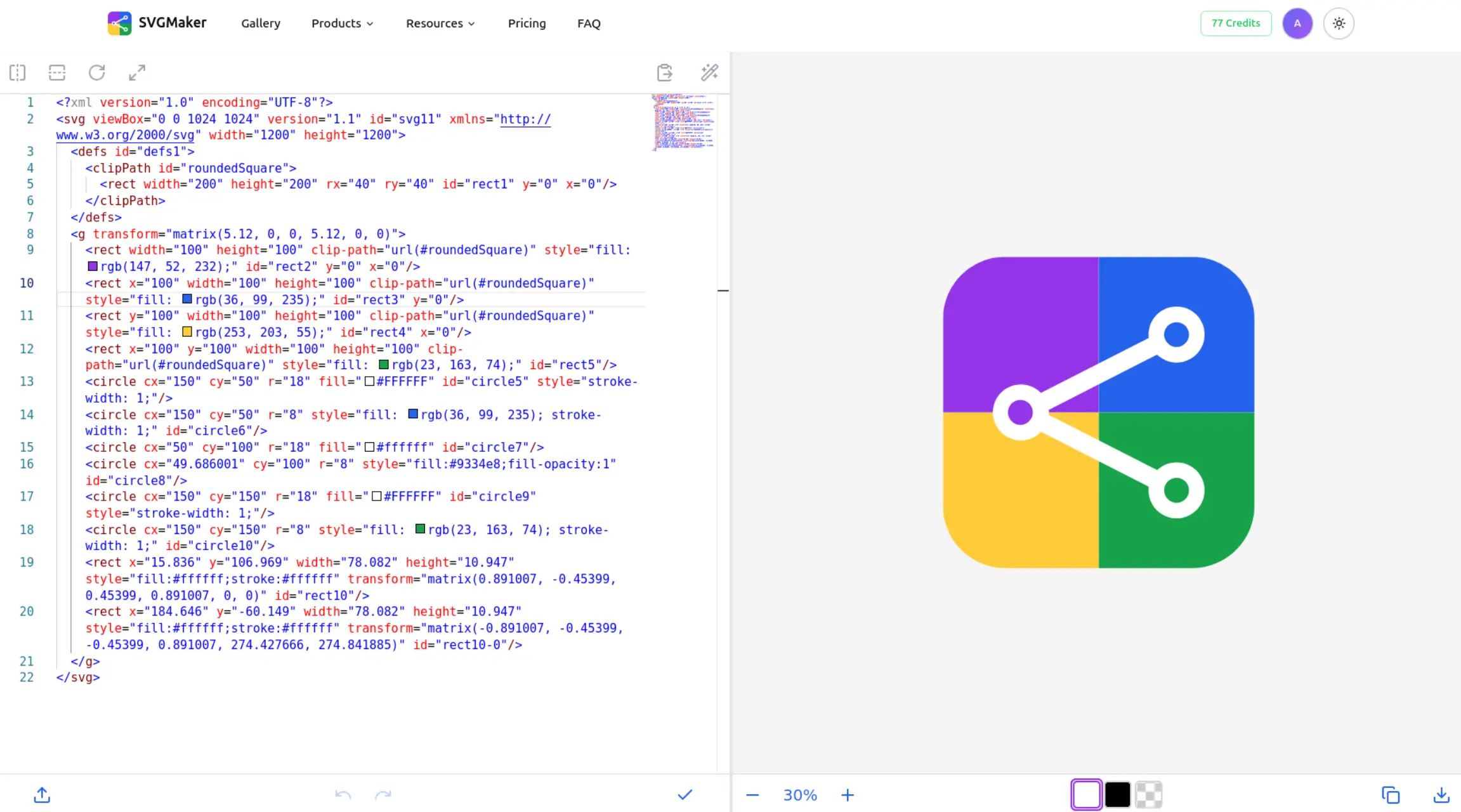
At its core, SVGMaker's SVG Code Editor uses Monaco Editor, the same editor that powers Visual Studio Code. This means you get the full professional editing experience: syntax highlighting, auto-complete, IntelliSense, code folding, and find-and-replace functionality. All of this runs directly in your browser with no installation required.
The real-time preview panel sits alongside your code, updating instantly as you type. There's no refresh needed. Change a colour value and watch it update immediately. Adjust a path coordinate and see the shape transform in real-time.
Performance & Speed Benefits
SVGMaker's SVG Code Editor is optimized for speed and efficiency, delivering a seamless editing experience:
Instant Load Time
The browser-based tool loads in under 2 seconds with no installation required. Unlike desktop editors like Adobe Illustrator (500MB+) or Inkscape (100MB+), SVGMaker runs directly in your browser with a lightweight ~5MB footprint.
Real-Time Preview (<50ms Latency)
Every code change reflects instantly in the preview panel with less than 50 milliseconds of latency. This immediate feedback loop eliminates the edit-save-refresh cycle that plagues traditional workflows.
One-Click Code Formatting
Prettier integration formats your entire SVG code in under 1 second. Messy, minified exports from design tools become clean, readable code instantly.
Fast Export Processing
Export to SVG, PNG, React, or any supported format in under 2 seconds. No waiting for heavy rendering processes.
Auto-Save Protection
Your work is automatically saved to browser localStorage every 3 seconds. Accidentally close the tab? Your changes are preserved.
Key Performance Metrics:
- 100,000+ SVG files viewed by users worldwide
- <50ms real-time preview latency
- <2 second page load time
- ~5MB lightweight bundle (vs 500MB+ desktop alternatives)
- <1 second code formatting
- <2 second export processing
Key Features: What Makes SVGMaker's SVG Code Editor Stand Out
Monaco Editor Integration
Unlike basic text areas found in simpler tools, Monaco Editor provides:
Full syntax highlighting that makes SVG code readable and errors visible
IntelliSense for intelligent code completion
Code folding to collapse sections and focus on what matters
Find and replace with regex support for bulk changes
Keyboard shortcuts familiar to VS Code users
This professional-grade editing experience is what separates SVGMaker from competitors that rely on basic text inputs.
Live Real-Time Preview
The preview panel reflects every keystroke instantly. This immediate feedback loop changes how you work with SVG code:
See the visual impact of coordinate changes as you type
Experiment with colours and immediately see the result
Catch rendering issues the moment they occur
Debug path data by watching shapes form in real-time
Code Validation and Formatting
SVGMaker's SVG Code Editor includes real-time validation that catches syntax errors as you type. Invalid code is highlighted with clear error messages, helping you identify and fix issues before they become problems.
The one-click Prettier integration formats your SVG code instantly. This is especially valuable when working with SVG exports from design tools like Illustrator or Figma, which often produce minified or poorly formatted code. Clean, well-formatted code is easier to read, understand, and maintain.
Advanced Editing Capabilities
Beyond basic code editing, SVGMaker, an AI powered SVG Maker provides free tools specifically designed for SVG work:
Color Editing
Modify fill and stroke attributes using any CSS colour format, including hex, RGB, and HSL
Size Adjustments
Edit width, height, viewBox, and element dimensions with instant visual feedback
Gradient Support
Create and modify linear or radial gradients by editing the <defs/> section
Zoom Controls
Zoom up to 200% to examine fine details or zoom out to see the complete picture
Pan Support
Click and drag to navigate large or zoomed-in SVGs
Transform Tools
Flip horizontally, flip vertically, or rotate 90 degrees with single clicks
Quick Resize
Access common dimension presets through a convenient dialogue
Export Options
This is where SVGMaker truly outperforms competitors. While most tools let you download your SVG, SVGMaker offers multiple export formats:
SVG Download
The standard vector format
PNG Export
Raster output with customizable dimensions for any resolution you need
Copy to Clipboard
Instant code copying for quick integration
React Component
Export as a ready-to-use React component
React Native
Format optimised for mobile React Native projects
HTML/CSS
Complete HTML document with embedded SVG
This variety of export options means you can go directly from editing to implementation without additional conversion steps.
Convenience and Accessibility
SVGMaker's SVG Code Editor works everywhere:
Auto-Save
Your work automatically saves to browser localStorage, so you never lose changes even if you accidentally close the tab or refresh the page
Background Toggle
Switch between white, dark, and transparent backgrounds to see how your SVG looks in different contexts
Mobile-Friendly
Works on iOS and Android browsers, so you can view and edit SVGs even from your smartphone
No Account Required
Start editing immediately without signup or login
Privacy-Focused
Your files are never uploaded to servers; all editing happens locally in your browser
WalkThrough: How to Use SVGMaker's SVG Code Editor
Getting started takes just three steps:
Open Your SVG
Navigate to SVGMaker's SVG Code Editor and either upload your SVG file using the upload button or paste your SVG code directly into the Monaco Editor. The viewer instantly loads your file and displays both the code and visual preview.
Edit and Preview in Real-Time
Make your changes in the code editor on the left while watching the preview update on the right. Use the zoom and pan controls to examine details. Apply transforms with the toolbar buttons. Format your code with one click when you're ready to clean it up.
Download or Copy
When you're finished, export your SVG in whatever format you need. Download the SVG file, export as PNG at your chosen dimensions, copy the code to the clipboard, or export as a React component ready for your project.
Real World Use Cases: Who Benefits from This Tool?
Web Developers
If you work with web projects, you'll frequently need to inspect, debug, or modify SVG code. Whether you're fixing an icon that doesn't render correctly, adjusting colours to match a design update, or cleaning up SVG exports for better performance, SVGMaker's SVG Code Editor streamlines the entire process.
UI/UX Designers
Designers who need to make quick code-level adjustments or want to understand how their designs translate to SVG markup will find this tool invaluable. The real-time preview makes it easy to experiment with modifications and immediately see the results.
Game Developers
Game assets often use SVG format for scalability across different screen sizes. The ability to edit sprites, icons, and UI elements with immediate visual feedback accelerates asset development and debugging.
Students and Educators
Learning SVG syntax becomes much easier when you can see exactly how each code change affects the visual output. The instant feedback makes SVGMaker's SVG Code Editor an excellent educational tool for understanding vector graphics.
Comparisons: Popular Online SVG Code Editors
Let's look at the options available for editing SVG code with some form of preview capability.
| Features | SVGMaker | VSCode | SVGViewer.dev | svgai.org | Adobe Illustrator | Inkscape |
|---|---|---|---|---|---|---|
| Real-time Preview | Yes | Extension Required | Yes | Yes | Yes | Yes |
| Code Validation | Yes | Yes | Basic | Yes | Basic | Yes |
| Free to Use | Yes | Yes | Yes | Yes | No | Yes |
| Professional Code Editing | Yes | Yes | No | Yes | No | No |
| Export Options | SVG, PNG, JSX (React, React Native), HTML, CSS, PDF, EPS, AI, DXF, JPG, WebP, Data URI | Extension Required | SVG, PNG, Data URI, React, React Native | SVG | SVG, PNG, PDF, EPS, AI | SVG, PNG, PDF, PS, EPS |
| Platform Accessibility | Cloud-Based | Desktop | Cloud-based | Cloud-based | Desktop | Desktop |
| Canvas And View Control | Yes | Extension required | Limited | Limited | Yes | Yes |
| Persistence & Workflow | Auto-save to localStorage | Local files, Git integration, extensions | Browser session only | Browser session only | Cloud documents, auto-save, Creative Cloud | Local saves, extensions |
Frequently Asked Questions
1. Is this Online SVG Code Editor free to use?
Yes, SVGMaker's SVG Code Editor is completely free with no limitations. All features, including Monaco Editor, live preview, code validation, and formatting, are available at no cost. No account or payment required.
2. Can I use it on my smartphone?
Yes, SVGMaker's SVG Code Editor works directly in your mobile browser on both iOS and Android devices. Upload your SVG file or paste the code and view it instantly without installing any apps.
3. Are my files stored on your servers?
No. All editing happens locally in your browser using localStorage for auto-save functionality. Your files remain private and are only saved on your device.
4. What export formats are supported?
You can export as SVG (vector), PNG (raster with custom dimensions), React component, React Native component, and HTML/CSS format. You can also copy the SVG code directly to the clipboard.
Conclusion
When it comes to editing SVG code with real-time preview, SVGMaker's SVG Code Editor offers one of the most complete solutions available. By combining Monaco Editor's professional coding features with instant live preview, built-in code validation, Prettier formatting, and flexible export options, it clearly stands out from the alternatives.
Whether you're a developer debugging SVG rendering issues, a designer tweaking vector assets, or a student learning SVG syntax, this free browser-based tool delivers everything you need without installation, registration, or compromise on features.
Ready to experience a better way to work with SVG code? Try SVGMaker's SVG Code Editor and see the difference real-time preview makes.
