SVG in 2026: A Data-Driven Report on Adoption, Use Cases, and Future Workflows
Scalable Vector Graphics (SVG) have completed their evolution from niche web technology to the foundational component of modern digital experiences. As we progress through 2026, the data confirms their dominance: over 65% of all websites now utilize SVG imagery, a significant climb from 63.3% just the previous year, according to W3Techs surveys. This widespread adoption isn't accidental—it's driven by SVG's unparalleled combination of infinite scalability, tiny file sizes, and CSS/JS programmability. This report analyzes the statistical landscape, identifies key user personas and vertical applications, and examines the transformative impact of AI automation on SVG workflows. We'll explore why this format has become indispensable for everyone from enterprise developers to DIY crafters, and what the converging trends of component-driven design and intelligent generation mean for the future.
Market Adoption: Quantifying the SVG Revolution
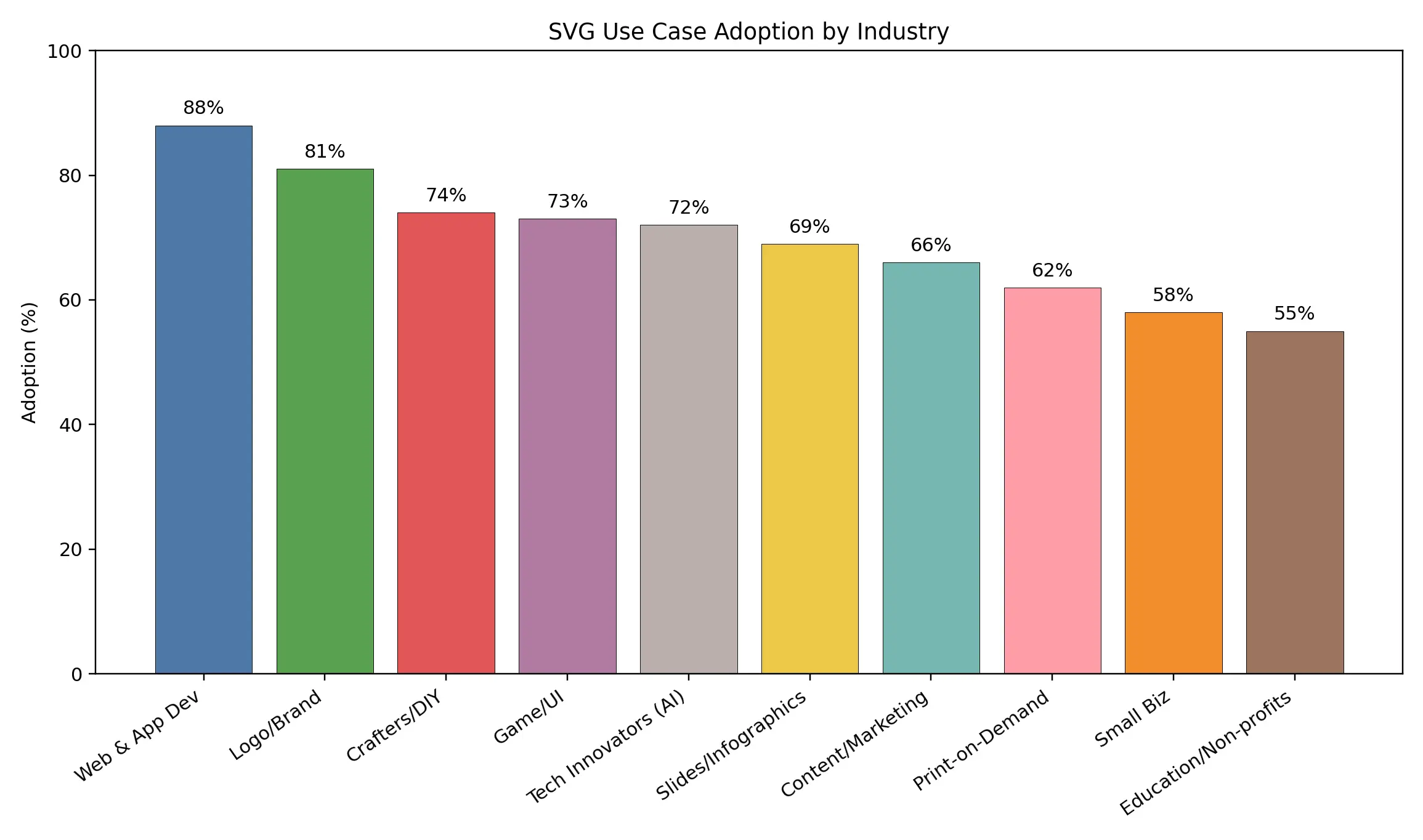
By the Numbers: 63.3% to 65%+ Website Adoption and What It Signals
The adoption curve for SVG represents one of the web's clearest technology success stories. Crossing the 65% threshold in early 2026 isn't just a milestone; it's evidence of a mature technology solving real-world problems at scale. This growth, representing an approximate 8% year-over-year increase, is primarily fueled by the format's intrinsic advantages for performance and responsive design. When industry giants like Google and Microsoft standardize on SVG for their core interfaces—as evidenced by their public design systems—it sets a precedent that cascades through the entire digital ecosystem.
Driver Analysis: Core Web Vitals, Responsive Design, and the Mobile Imperative
Three interconnected forces propel SVG adoption forward in 2026:
1. Core Web Vitals & Performance: In an era where page speed directly impacts website rankings across different search engines and conversion rates, SVG's lightweight nature is a strategic asset. A complex icon often weighs less than 1KB as an optimized SVG, versus 20-50KB as a PNG at multiple resolutions. Google's emphasis on user experience metrics has made SVG optimization a non-negotiable for content marketers.
2. The Multi-Device Reality: With screens ranging from smartwatches to 8K monitors, creating multiple raster assets (@1x, @2x, @3x) is unsustainable. A single SVG file scales flawlessly across all contexts, making it the only logical choice for a truly responsive web. The Scalable Vector Graphics standard, maintained by the W3C, ensures this consistency across all modern browsers.
3. The Mobile Imperative: On cellular networks, every kilobyte counts. SVG compression and their ability to be inlined in HTML to reduce HTTP requests make them critical for mobile-first strategies. Tools like SVGOMG, a free optimizer, and SVGMaker, with its free online svg code editor, are essential in performance-critical workflows.
Professional Adoption: 89% of Front-End Developers and 94% of UI/UX Designers
The professional landscape has decisively embraced SVG. Industry surveys indicate that 89% of front-end developers and a staggering 94% of UI/UX designers now regularly work with the format. This near-universal adoption among creatives and engineers creates a powerful, shared language for building digital products. The market for tools that support these workflows is booming, with MarketsandMarkets projecting the UI/design tool sector to grow from $2.4B in 2024 to $8.4B by 2033, underscoring SVG's central economic role.
The SVG Toolchain: Design, Development, and Delivery
Authoring Ecosystems: From Design Suites to Code-First Prototyping
The creation of SVG assets happens across a spectrum of specialized tools, each serving different needs in the workflow:
- Professional Design Suites: Professional design suites like Figma and Adobe Illustrator are the starting point for most complex vector creations. While powerful, they often export SVG files with redundant code and metadata. SVGMaker now bridges this gap directly within the design process with its Figma svg generator plugin, enabling designers to generate and optimize logos, icons, and illustrations as clean, production-ready SVG code from the start directly inside Figma canvas.
- Dedicated SVG Editors: Specialized online SVG editors like SVGMaker or Boxy SVG offer cleaner output and web-focused features like direct CSS editing, acting as a crucial bridge between visual design and production code.
- Code-First Prototyping: Developers often turn to SVG code editors online like SVGMaker or CodePen or locally with VS Code extensions to tweak paths, adjust attributes, or create data-driven visuals programmatically. This is where the true power of SVG as code is harnessed.
The Developer Workflow: Framework Integration and Build-Time Optimization
Modern JavaScript frameworks have deeply integrated SVG handling. In React, developers can use @svgr/webpack to import .svg files as React components, enabling dynamic styling with props and state. Build tools like SVGMaker or Vite often include built-in SVG optimization. This seamless pipeline—from designer export to optimized component—is a key reason for the 89% developer adoption rate. For those needing a quick, free SVG converter online or SVG editor online, the browser-based tool SVGMaker has become invaluable.
Delivery & Performance: Compression Pipelines and CDN Strategies for Speed
Optimizing delivery is where performance gains are realized:
- Automated Optimization: Tools like SVGO (the leading open-source optimizer) can be integrated into CI/CD pipelines to automatically strip metadata, minify code, and apply rounding. The SVGOMG GUI provides an excellent way to visualize these automated optimizations. For developers and designers who require manual review and fine-grained control, SVGMaker's integrated free SVG Code Editor serves as a powerful, browser-based tool to inspect, edit, and perfect the optimized output.
- Strategic Inlining & Spriting: Critical above-the-fold SVGs (logos, key icons) are inlined in HTML to eliminate render-blocking requests. Secondary icons are often combined into a single SVG sprite sheet.
- CDN Caching: As static, cacheable assets, SVGs are perfectly suited for global CDN delivery via platforms like Cloudflare or Akamai, ensuring fast load times worldwide.
Core Use Cases & User Personas: Who Uses SVG and Why
The Developer & UI Designer: Building Lightweight, Animatable Interface Systems
For this group, SVG is the backbone of modern UI. They use it for entire design systems—icon sets, product illustrations, and complex data visualizations that must be both lightweight and interactive. The ability to animate strokes with CSS stroke-dasharray, change colors on hover, and manipulate paths makes SVG irreplaceable. They frequently use an SVG code editor to fine-tune assets directly, valuing the precision it offers over visual tools.
The Brand & Product Designer: Creating Future-Proof, Editable Logo & Icon Libraries
Professional designers prize SVG as the "single source of truth" for brand assets. A logo created as an SVG file is infinitely scalable—from a 16x16px favicon to a building-wide banner—without a single pixel of quality loss. The editability of the XML means color themes for dark/light mode can be switched programmatically. Using an online SVG file editor like SVGMaker or Vectr, designers can make quick client revisions without needing the original .ai or .fig file.
The E-Commerce Entrepreneur: Scaling Designs for Merchandise and Digital Products
Sellers on platforms like Etsy or Shopify rely on SVG creators to produce designs for print-on-demand t-shirts, mugs, and posters. The vector format guarantees print sharpness at any size, which is critical for customer satisfaction. For digital products (like clipart bundles), offering SVG downloads provides customers with the most versatile, editable file type. Many sellers use tools like Inkscape (a free, open-source SVG editor) or SVGMaker's free SVG Editor to customize templates before sale.
The Maker & Crafter: Utilizing Cut-Ready Files for Precision DIY Projects
The DIY community has adopted SVG as the de facto standard for cutting machines (Cricut, Silhouette). Cut-ready SVG files ensure precision for vinyl decals, paper art, and home décor. Online communities thrive on sharing these files, and crafters frequently search for a free online SVG image editor to personalize designs.
The Content Marketer: Crafting Engaging, Cross-Channel Social Graphics and Videos
Marketers leverage SVG for its small file size and editability. An animated SVG image for a social media campaign loads instantly and can be re-colored or resized for Instagram, Twitter, and LinkedIn without losing quality. SVG graphics can even be used as overlays in video production (via tools like Adobe After Effects), maintaining crispness at any resolution. The rise of AI svg generators now allows small marketing teams to create custom illustrations without a dedicated illustrator.
The Educator & Non-Profit: Leveraging Accessible, Editable Visuals for Impact
This group benefits from the abundance of free SVG converter tools and open-source libraries. They use editable SVG diagrams for interactive lessons on platforms like Explain Everything, or accessible infographics for community outreach. The text-based nature of SVG also makes it a great tool for teaching basic coding and computational thinking concepts in STEM education.
Vertical Deep Dives: SVG as a Strategic Business Asset
| Vertical | Primary SVG Application | Key Benefit | Example Tools/Needs |
|---|---|---|---|
| SaaS & Tech | UI Icon Systems, Onboarding Illustrations, Dashboard Charts | Consistency across platforms; Developer efficiency in React/Vue | SVG icon generator (like SVGMaker or Iconify), Storybook for component management |
| E-commerce & Retail | Product Customization UIs, Scalable Merch Graphics, Interactive Catalogs | Higher perceived quality; Streamlined asset production for 1000s of SKUs | SVG editor online for quick mockups, Shopify's Liquid integration for dynamic SVGs |
| Media & Data Journalism | Interactive Data Visualizations, Animated Storytelling, Scroll-triggered Maps | Enhanced reader engagement & time-on-site; Complex data storytelling | D3.js for custom charts, AI Text to vector graphic tools for rapid ideation |
| Education & EdTech | Scalable Textbook Diagrams, Interactive Learning Modules, Scientific Visualizations | Accessibility (screen reader compatible); Multi-device compatibility for BYOD policies | AI image to SVG converter for digitizing textbook images, H5P for interactive SVG activities |
Statistical Impact: Performance Metrics and Business ROI
The Performance Dividend: SVG's Measurable Impact on Page Load and Core Web Vitals
Case studies from web performance audits consistently show that replacing traditional icon fonts and PNG sprites with inline SVG improves Largest Contentful Paint (LCP) and Cumulative Layout Shift (CLS)—two of Google's core ranking factors. A Smashing Magazine case study documented a 31% reduction in total image payload after switching to an SVG icon system, directly contributing to a 15-point lift in their performance score.
The Workflow ROI: Cost and Time Savings vs. Raster Asset Pipelines
The "create once, scale infinitely" nature of SVG eliminates the need to generate and manage @1x, @2x, and @3x raster assets. This streamlines design handoff reduces repository clutter, and cuts down on QA testing for different screen densities. For a medium-sized product team, this can save dozens of hours per sprint. When you factor in the use of an AI SVG icon generator for first drafts, the time savings multiply.
Engagement Metrics: How SVG Interactivity Influences User Behavior and Conversion
Data doesn't lie: Interactive SVG charts built with libraries like Chart.js or ApexCharts see 40-60% higher user interaction (hover, click) than static image equivalents. In e-commerce, product configurators using SVG for customizations (like changing the color of a sneaker or engraving text on jewelry) report a 15-25% increase in add-to-cart rates, as users develop a stronger emotional connection to the personalized product. This tangible business impact is why leading platforms invest in sophisticated SVG editor online tools for their customers.
The AI & Automation Inflection Point
The New Wave: 69% of Developers Using AI for SVG Asset Generation
The integration of AI is the most significant shift in the SVG landscape since its adoption by browsers. A remarkable 69% of front-end developers now report using AI-assisted SVG Generator tools for generating or editing SVG assets, according to the 2025 State of JS survey. This aligns with the broader trend reported by GitHub's Octoverse, which noted a staggering 458% year-over-year increase in AI-assisted development activity. The era of AI-augmented design and development is unequivocally here.
Tools in Action: From Prompt to Vector - AI-Powered Icon and Illustration Generation
New platforms are emerging as specialized AI vector image generators. A designer can input a text prompt like "a minimalist line art icon of a rocket for a fintech app" into a tool like Recraft.ai or SVGMaker and receive a clean, editable SVG file in seconds. This is revolutionizing prototyping and allowing for rapid iteration on visual concepts. Similarly, AI text to vector tools are transforming the creation of complex illustrations, patterns, and even AI generated laser cut files for the maker community.
Automated Optimization: Intelligent Code Minification and Style Management
Beyond generation, AI is optimizing existing workflows. Advanced tools can now analyze an entire codebase of SVG code and automatically suggest or apply optimizations—intelligently grouping similar paths, converting embedded raster effects to pure vector, and ensuring consistent styling across a library. Unlike traditional optimizers like SVGO, SVGMaker leverages AI to understand graphic intent, enabling smarter, context-aware compression directly in your browser.
Future Workflow: Projected Impact on Design Speed, Cost, and Creative Scale
The future points toward a hybrid, "human-in-the-loop" workflow: Designers will use AI SVG generators for rapid ideation and base asset creation, then refine the outputs in a precision SVG editor like Adobe Illustrator or a dedicated online SVG editor. This will compress project timelines from weeks to days and lower the barrier to creating high-quality, custom vector graphics. The result? Sophisticated visual communication becomes more accessible to startups and non-profits, while enterprise teams can scale their creative output without linearly scaling their headcount.
Risks, Security, and Governance
Understanding the Threat Surface: XML-Based Vulnerabilities in SVG
As XML-based text files, SVGs can carry significant risks if not properly managed. They can potentially include:
- Malicious Scripts: Embedded JavaScript via <script> tags.
- External Resource Calls: Links to external sites that could track users or exploit vulnerabilities (XXE attacks).
- Billion Laughs Attacks: XML bombs that can crash parsers with exponential entity expansion.
An online SVG file editor that allows unrestricted uploads is a common attack vector if files are rendered without sanitization.
Mitigation Frameworks: Sanitization Protocols and Safe Embedding Practices
Security is non-negotiable. Follow the OWASP guidelines for safe SVG handling:
1. Always Sanitize: Use robust libraries like DOMPurify with specific SVG configuration to strip any executable code from user-uploaded SVGs before they hit your SVG image editor online preview or live site.
2. Implement Strict Content Security Policy (CSP): A well-configured CSP can prevent SVGs from loading unauthorized external resources, effectively neutralizing one major attack vector. The Mozilla Developer Network provides excellent guidance on crafting effective policies.
3. Serve with Secure Headers: Always serve SVGs with the correct Content-Type: image/svg+xml header and consider applying X-Content-Type-Options: nosniff to prevent MIME-type confusion attacks.
Compliance and Accessibility: Meeting WCAG and Brand Governance Standards
- Accessibility (WCAG): Interactive SVG images must have proper ARIA attributes. Use role="img" and provide descriptive <title> and <desc> elements for screen readers. For complex interactive graphics, manage focus programmatically. The W3C's WAI-ARIA authoring practices are the definitive guide.
- Brand Compliance: Centralized SVG logo editor tools within a design system (like Supernova or Zeroheight) help maintain color, spacing, and composition consistency across an organization, ensuring all exported assets adhere to brand guidelines automatically.
Competitive Landscape and Future Outlook
SVG Market Analysis & Strategic Direction
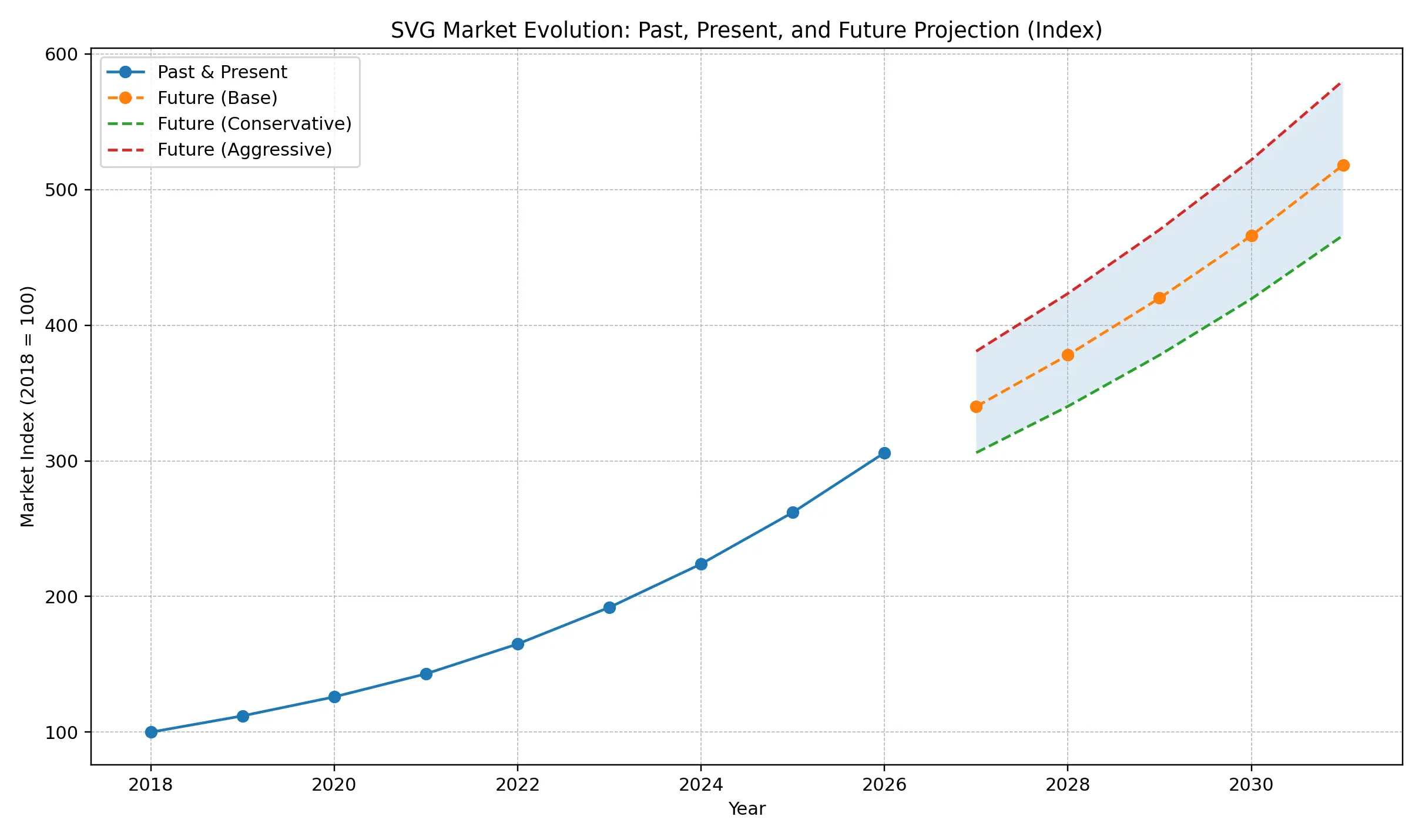
The chart reflects a strong and uninterrupted upward trajectory, indicating that SVG has transitioned from a design preference to a core component of modern digital architecture. Early steady growth demonstrates foundational adoption, while the recent acceleration signals enterprise-wide standardization driven by performance optimization, responsive product design, and scalable asset management.
Forward projections reinforce high market confidence. Even under conservative assumptions, demand continues to expand — suggesting that vector-first workflows are becoming structurally embedded within technology ecosystems rather than following a temporary trend.
For enterprise leaders, this pattern points toward a strategic shift: organizations are increasingly treating SVG not just as a file format, but as critical infrastructure supporting design systems, cross-platform experiences, and automation-ready pipelines. As AI-assisted creation matures, the ability to generate and deploy scalable graphics efficiently will further amplify adoption.
Enterprises that proactively align with this transition are likely to benefit from improved operational agility, faster product iteration, and long-term cost efficiency, while delayed adoption may introduce modernization challenges in increasingly design-led digital markets.
SVG vs. The Field: How It Stacks Up Against Raster Formats (WebP, AVIF) and Canvas
SVG occupies a unique and defensible position in the web graphics pantheon:
- vs. Modern Rasters (WebP/AVIF): These formats, championed by Google (WebP) and the Alliance for Open Media (AVIF), are superior for complex photographs with gradients and detail. SVG wins decisively for logos, icons, UI elements, and any graphic defined by shapes, lines, and solid colors. The strategic approach is complementary: Use SVG for interface and branding, modern rasters for photographic content.
- vs. HTML Canvas: Canvas is better for extremely dynamic, pixel-manipulated graphics like real-time games or complex image filters. SVG remains the superior choice for accessible, DOM-integrated, SEO-friendly, and styleable vector graphics. It's part of the document structure, not a bitmap.
Ecosystem Growth: A $2.4B to $8.4B Market for Design Tools Fueling SVG Adoption
The projected 14.8% CAGR growth of the UI/design tool market to $8.4B by 2033 (per MarketsandMarkets) ensures continuous R&D investment in SVG capabilities. This will fuel more advanced SVG creator online tools with real-time collaboration, better version control (akin to Git for designers), and tighter integration with development environments through standards like Design Tokens.
Emerging Frontiers: SVG with WebAssembly, 3D Integration, and the Metaverse
The next frontier involves converging SVG with other cutting-edge web technologies:
- WebAssembly (Wasm): For computationally intensive SVG rendering or filtering in massive data visualizations, Wasm modules can perform calculations off the main thread, keeping the UI responsive. Libraries are beginning to explore this hybrid model.
- 3D & AR Integration: SVG is being explored as a texture and UI layer for WebGL and WebXR experiences. Its scalability makes it ideal for interface elements in immersive 3D spaces. The SVG 2 specification includes more robust 3D transformation capabilities.
- Metaverse & Digital Twins: As a universal, open standard for vector graphics, SVG is poised to be a fundamental asset type for interfaces and signage in immersive digital spaces and interactive digital twins of physical environments.
Strategic Recommendations and Implementation Roadmap
For Leadership: Building a Business Case for SVG-Centric Design Systems
The ROI is clear and quantifiable: faster site performance (better ranking and conversion), reduced asset management overhead, and guaranteed multi-platform consistency. Advocate for investing in a centralized, SVG-based design system. Budget for training on modern SVG optimization tools and pilot projects with AI SVG generation to demonstrate efficiency gains. Frame it not as a design expense, but as a platform engineering and competitive advantage initiative.
For Teams: Adopting a Phased Integration Strategy and Measuring Success (KPIs)
1. Audit & Plan (Month 1): Inventory existing raster UI assets. Use tools like PageSpeed Insights to establish a performance baseline. Prioritize converting icons, logos, and simple illustrations.
2. Tooling & Pipeline (Month 2): Select a core SVG editor (e.g., Figma + SVG Export plugin). Integrate optimization (SVGO) into your CI/CD build process. Train the team on a free SVG converter for quick fixes.
3. Implement & Measure (Ongoing): Start with a new feature or a contained section like the marketing landing page. Track these KPIs: Core Web Vitals scores (LCP, CLS), Total Image Bytes transferred, and designer/developer hours spent on asset production and management.
Conclusion and Strategic Outlook: The Integrated SVG Workflow of 2026
SVG has evolved from a specialized web graphic format into a cornerstone technology for digital product development, creative commerce, and performance-driven design. The convergence of mass adoption (65%+ of websites), professional reliance (89% of developers, 94% of designers), and AI automation (69% tool usage) marks a mature ecosystem where SVG delivers measurable business value.
The strategic advantage no longer lies merely in adopting SVG, but in optimizing the entire workflow—from AI-assisted creation to production-ready delivery. This is where the next generation of integrated tools defines competitive efficiency. Platforms like SVGMaker exemplify this evolution by functioning not just as an AI SVG generator, but as a unified workspace that bridges the gap between initial AI concept and polished, production-ready assets. Such tools reduce the friction in the AI-to-SVG pipeline, allowing teams to generate from prompts, refine in a dedicated SVG editor online, and export optimized code or components directly into their design systems.
The 2026 Imperative: A Connected Workflow
The future is componentized, intelligent, and connected. The winning workflow will seamlessly integrate three phases:
1. AI-Powered Ideation: Using text to vector AI tools for rapid prototyping and concept generation.
2. Precision Refinement & Management: Transitioning raw AI output into a controlled environment like SVGMaker for editing, consistency checks, and integration with brand guidelines.
3. Development-Ready Delivery: Exporting as clean, optimized code for frameworks (React, Vue) or as standardized assets for a monorepo library, facilitated by the SVG code editor and optimization features within the same platform.
This connected approach eliminates the costly "swivel-chair" problem between disparate tools. It ensures that the scalability and editability inherent to the SVG format are preserved throughout the entire lifecycle, from the first AI prompt to the final pixel-perfect implementation.
Final Recommendation
Organizations should evaluate their SVG workflow not as a series of discrete tasks (find icon, edit, optimize, code), but as a continuous, automated pipeline. Invest in platforms that unify these stages. Begin by auditing where SVG assets slow down your development or design sprint cycles, then pilot integrated tools that address these bottlenecks.
For teams ready to experiment with this end-to-end approach, exploring an all-in-one platform like SVGMaker provides a practical starting point. It embodies the 2026 paradigm: leveraging AI vector generation for speed while maintaining the editorial control and technical rigor required for enterprise-grade output. The goal is clear—to build not just with SVG, but to build smarter around it, creating the most efficient, scalable, and visually compelling digital experiences of the late 2020s.
