How to Create Professional Logos in 60 Seconds with AI Logo Generator
Paying $500 or more for a logo can feel overwhelming, especially when you are just starting out. You may be launching a small business, building a personal brand, or testing a new idea. Every dollar matters.
The good news is that you no longer need a large budget to create a professional logo. With an AI logo generator like SVGMaker, you can design a clean, scalable logo in about 60 seconds. You can download it in SVG format and use it for commercial purposes without complicated steps.
Let us explore how it works, how it compares to other tools, and how to make the most of your new logo.
What Is an AI Logo Generator
An AI logo generator is a tool that creates logos based on your written description. Instead of manually choosing icons and adjusting layouts one by one, you describe your brand and the AI generates logo concepts for you.
For example, you might type:
- Coffee shop vintage logo with warm brown tones
- Minimal tech startup logo with geometric icon
- Luxury fashion brand logo with elegant serif typography
The AI analyzes your input and combines shapes, typography, layout styles, and color palettes into a cohesive design.
How AI Creates Logos in Simple Terms
AI tools are trained on patterns from thousands of design examples. When you enter a prompt, the system interprets your keywords and predicts what visual elements match that description. It then assembles a logo concept that fits your requested style.
You are not choosing from a fixed template. You are guiding the design through your description. Learn more about AI-powered SVG generation and how modern algorithms create professional designs.
Why SVG Matters
When creating a logo, the file format is just as important as the design itself.
SVG stands for Scalable Vector Graphics. Unlike PNG or JPG files, SVG files can be resized to any dimension without losing quality.
That means your logo will look sharp:
- On a tiny social media profile image
- On a website header
- On printed business cards
- On banners or large signage
For any serious brand, scalability is essential. A blurry logo can hurt credibility. SVG ensures clarity at every size. Understanding the difference between SVG and PNG helps you choose the right format for each use case.
AI vs Template Based Logo Makers
Traditional logo makers often rely on templates. You pick a layout, change the name, adjust colors, and download. While fast, the results can feel generic.
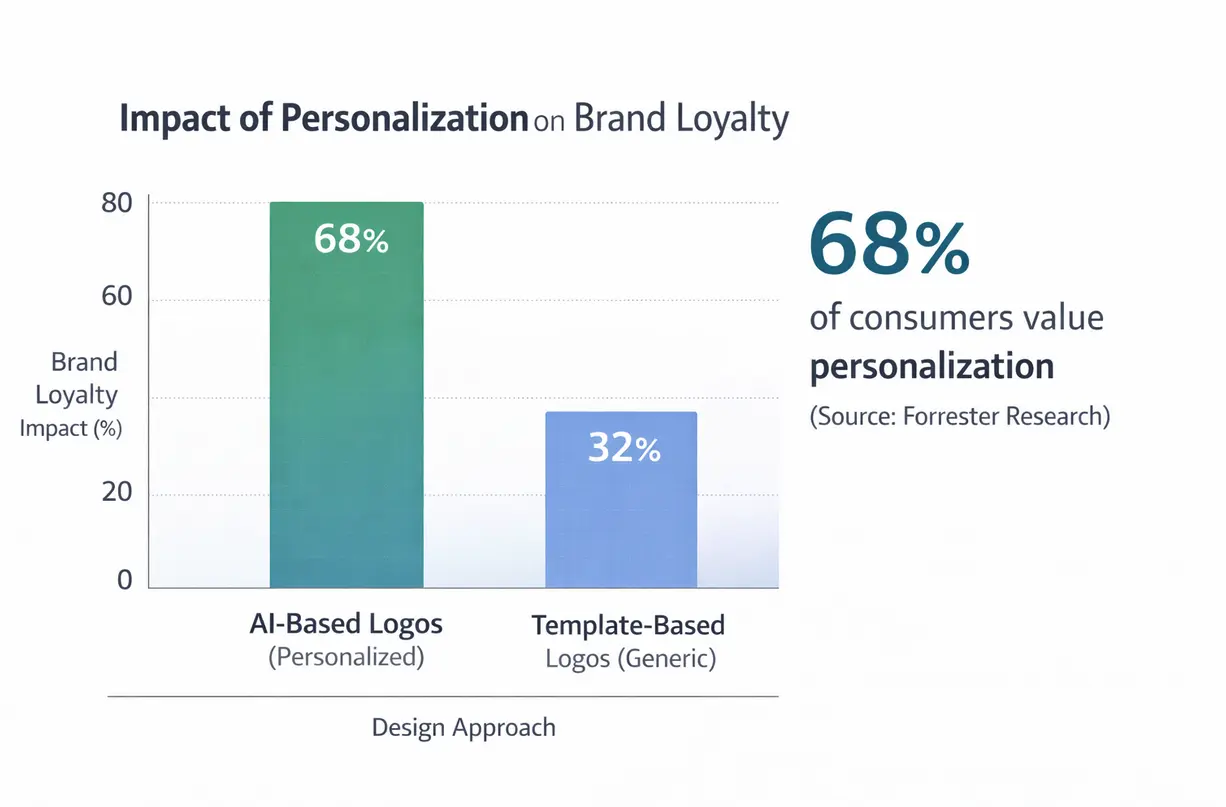
AI driven tools like SVGMaker generate designs based on your description. This allows for more variety and personalization. Instead of fitting your brand into a preset layout, the design adapts to your brand idea. According to Forrester Research, 68% of consumers say personalization impacts their brand loyalty, making unique branding increasingly important.
How to Create a Logo in 60 Seconds
Creating a logo with SVGMaker's AI generator is simple and intuitive. Here is how it works.
Step 1 Describe Your Brand
Start with a clear and specific description. The more detail you provide, the better the results.
Here are ten example prompts you can try:
- Coffee shop vintage logo with hand drawn style
- Modern tech startup logo with abstract circuit icon
- Yoga studio logo with lotus symbol and soft pastel colors
- Bold fitness brand logo in black and red
- Eco friendly skincare logo with leaf symbol
- Minimal real estate logo with building outline
- Bakery logo with warm beige and script typography
- Kids toy store logo with playful colorful letters
- Photography brand logo with camera outline
- Personal brand monogram logo with elegant serif font
Each prompt will produce different visual outcomes based on your wording.
Step 2 Choose Style Preferences
After entering your description, you can refine style preferences such as color tone, shape style, and overall mood.
Ask yourself:
- Is my brand formal or playful
- Is it modern or classic
- Do I want strong bold lines or soft curves
These decisions help shape the personality of your logo. For more guidance, explore style customization features in the documentation.
Step 3 Generate and Refine
Click generate and review your results. If the first version is not perfect, adjust your prompt. Add more detail or remove elements that feel unnecessary.
For example, instead of "modern logo", try "modern minimalist black and white logo with thin typography".
Small changes can lead to significantly different designs. Learn advanced techniques in our guide on creating your first SVG.
Step 4 Download SVG and PNG Versions
Once satisfied, download your logo in SVG format for scalability. You can also download a PNG version for quick online use using the SVG to PNG converter.
Within minutes, you have a professional logo ready for launch.
Best Free AI Logo Generators Compared
There are several AI logo tools available today. Let us compare four popular options.
| Tool | Free Tier | SVG Support | Commercial Use | Quality |
|---|---|---|---|---|
| SVGMaker | Yes | Yes | Yes | High |
| Design.com | Yes | Yes (SVG, EPS, PDF) | Yes | High |
| Canva AI | Limited | Limited | Yes | Medium |
| Looka | Preview only | Yes with payment | Yes with payment | High |
SVGMaker
Pros:
- Free generation
- Full SVG download support
- Commercial use allowed
- Fast and simple interface
Cons:
- Best results depend on clear prompts
SVGMaker stands out because it provides genuine SVG output and allows commercial use without forcing immediate payment. For detailed comparisons, see SVGMaker vs Canva, Figma, Adobe.
Design.com
Pros:
- AI generates industry-specific logo concepts from your business name and keywords
- Advanced AI chat editing lets you refine designs in plain language with copyright-safe outputs guaranteed
- Full SVG, EPS, and PDF vector exports plus high-resolution PNG and JPG with transparent backgrounds
- Brand auto-sync applies your logo's colors and fonts across business cards, email signatures, and social media assets automatically
- Unlimited logo edits and permanent file storage on all paid plans
- Plans start at $3/month (billed annually)
Cons:
- Browser-based only, with no desktop or mobile app
Design.com's AI logo generator is the strongest option for entrepreneurs who need a complete brand identity, not just a logo file. The combination of copyright-safe AI editing, vector exports, and automatic brand asset sync across multiple channels makes it a more complete solution than most tools at this price point.
Canva AI
Pros:
- Very popular and beginner friendly
- Integrated with other design tools
Cons:
- SVG downloads may require paid plan
- More template driven
Canva works well for quick designs but often limits advanced export features in the free version.
Looka
Pros:
- High quality logo combinations
- Strong typography pairing
Cons:
- Paywall before download
- Higher cost compared to basic AI tools
Looka delivers polished results but requires payment before accessing full files.
If your priority is affordability and true SVG access, SVGMaker offers strong value. Check out our list of best AI SVG generators for more options.
AI vs Hiring a Designer Cost Breakdown
Professional design services vary widely in price. According to Upwork's 2024 pricing data, logo design costs range significantly based on designer experience and project scope.
Freelancers on platforms like Fiverr may charge between $20 and $100 for basic logos. On Upwork, experienced designers may range from $50 to $500. Agencies often start at $500 and can exceed $5,000 for full branding packages.
AI tools typically range from free to about $10 per month.
When to Use AI
AI is ideal if:
- You are launching quickly
- You have a limited budget
- You need multiple ideas fast
- You want flexibility and experimentation
When to Hire a Designer
A professional designer may be better if:
- You require deep brand strategy
- You want fully custom illustrations
- You are building a large established company
- You need comprehensive brand guidelines
Many startups begin with an AI generated logo to validate their business idea. Once revenue grows, they invest in professional branding.
A Realistic Scenario
Consider a small ecommerce startup with a tight budget. Instead of spending $2,000 on a branding package, they used an AI logo generator to create a clean and simple identity. The money saved was invested in advertising and product development.
Within months, the business grew. Later, they refined their branding with a designer. Starting lean allowed them to move forward without financial strain. For more entrepreneurial guidance, read about starting a small craft DIY business.
How to Use Your Logo Effectively
Creating the logo is only the beginning. Using it correctly makes all the difference.
Understanding File Formats
SVG: Best for scaling, printing, and long term use. This should be your primary file.
PNG: Great for websites, presentations, and social media posts.
JPG: Useful for basic online use but does not support transparency well.
Sizing for Different Uses
- For social media, use square versions
- For websites, create horizontal layouts
- For business cards, ensure high resolution exports
- For merchandise, rely on SVG for clean printing results
Create Brand Variations
Strong brands prepare multiple versions of their logo:
- Horizontal layout
- Vertical layout
- Icon only version
- Black and white version
These variations ensure consistency across platforms and materials. The SVG editor makes creating variations simple and efficient.
Common Mistakes to Avoid
Even with AI, thoughtful design matters.
Too Complex
Logos with too many details can become unclear when reduced in size. Simplicity improves recognition. Research from Nielsen Norman Group shows that simple, recognizable icons perform better in user testing.
Trend Driven Fonts
Trendy typography may look outdated quickly. Choose timeless fonts that align with your brand personality.
Not Testing in Black and White
A good logo should remain clear without color. Test it in black and white to ensure it still works.
Ignoring Copyright Awareness
Avoid requesting logos that imitate famous brands. Focus on originality and your own identity to reduce legal risks. For more on legal considerations, consult the U.S. Copyright Office guidelines.
Frequently Asked Questions
1. Can I trademark an AI generated logo?
In many countries, you can trademark an AI generated logo if it meets the legal requirements for originality and distinctiveness. However, trademark laws vary by country. Before filing, it is wise to check your local intellectual property office guidelines or consult a legal professional to ensure your logo qualifies. The USPTO provides comprehensive guidance on trademark registration.
2. Do I own the copyright?
Ownership depends on the platform's terms of use. With tools like SVGMaker, users are generally granted rights to use the generated logos. Always review the terms of service carefully to understand your usage and ownership rights clearly.
3. Can I use it for commercial purposes?
Yes, you can use logos generated through SVGMaker for commercial purposes. That means you can use them on websites, products, packaging, advertisements, and social media. Always confirm the current usage policy on the platform to stay compliant.
4. What if I need revisions later?
You can return to the generator anytime and refine your prompt to create updated versions. You can also edit your SVG file directly using vector editing tools to adjust colors, fonts, or layout as your brand evolves.
5. Is an AI logo good enough for a professional business?
For many startups, freelancers, and small businesses, AI generated logos are more than sufficient. They provide clean, scalable designs quickly. As your business grows, you can always invest in deeper branding if needed.
6. Why is SVG better than PNG or JPG for logos?
SVG files are scalable without losing quality. This makes them ideal for printing, large signage, and responsive websites. PNG and JPG files can lose clarity when resized, but SVG remains sharp at any size.
7. How many logo versions should I create?
It is recommended to create at least three versions: a horizontal layout, a vertical layout, and an icon only version. You should also test a black and white version to ensure versatility.
8. Can I edit my logo after downloading it?
Yes. If you download the SVG file, you can edit it later using vector editing software. You can edit SVG files online to change colors, resize elements, adjust typography, or modify spacing without reducing quality.
9. Will my logo look unique if others are using AI too?
AI tools generate designs based on your specific prompts. The more detailed and personalized your description, the more unique your result will be. Adding brand specific elements and refining your prompt helps create a distinctive outcome.
10. Is using an AI logo generator better than hiring a designer?
It depends on your needs and budget. AI is excellent for speed and affordability. A designer is better if you need deep brand strategy and custom illustration work. Many businesses start with AI and later upgrade as they grow.
Conclusion
Creating a professional logo no longer requires a large budget or advanced design skills. With an AI logo generator like SVGMaker, you can design, refine, and download a scalable SVG logo in about 60 seconds.
For startups, freelancers, creators, and small business owners, this approach offers speed, flexibility, and affordability. You can test ideas quickly, adjust as your brand grows, and maintain full control over your visual identity.
If you are ready to build your brand without overspending, try SVGMaker today and create a professional logo that grows with your business. Explore the quick start guide to begin your design journey.
