How to Check If an SVG File Is Safe: Detect Scripts, Malware and XSS
You download an SVG logo from a marketplace or receive one from a client. It looks like an ordinary image, so you may be tempted to open it or paste it directly into a website.
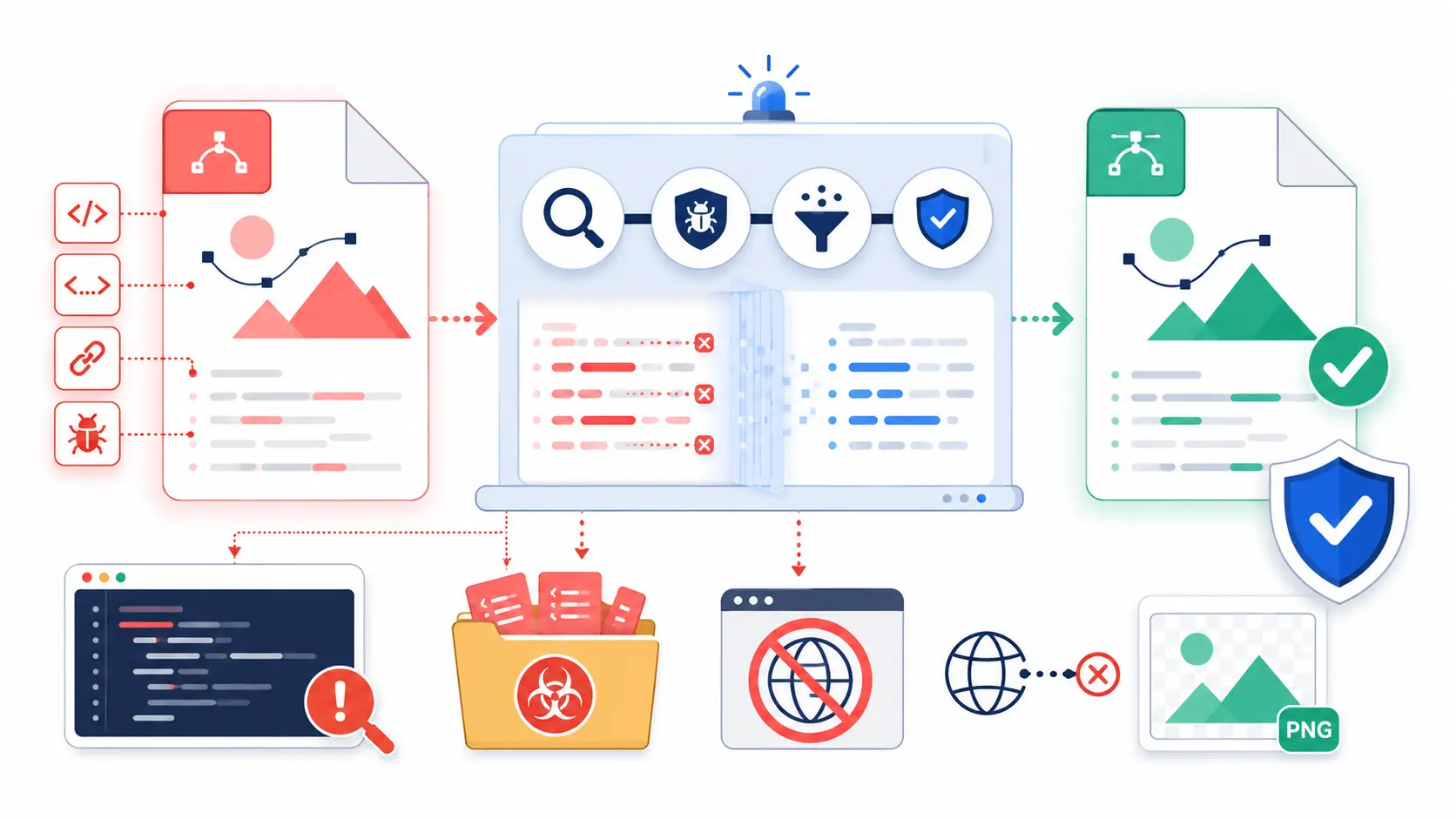
An SVG is XML rather than a flat collection of pixels. Alongside visible shapes, it can contain scripts, event handlers, links, HTML, styles, and remote references. In an unknown file, those features can create cross site scripting, privacy leaks, unwanted requests, or denial of service problems.
The safest rule is simple: treat every unknown SVG as code until you have inspected, sanitized, and verified it.
This guide explains how to do that without assuming every SVG is malicious.
Can SVG Files Contain Malicious Code?
Yes. An SVG can contain active markup that becomes dangerous in the wrong rendering context. The most obvious example is a <script> element:
But removing <script> alone is not enough. JavaScript can appear in event attributes such as onload, onclick, or onerror. Unsafe URLs can hide in attributes and CSS, while <foreignObject> can embed HTML. XML features and excessive complexity can also create parser or resource exhaustion risks.
For example, this SVG has no <script> element, but its onload attribute still tries to execute JavaScript:
Saving an SVG does not automatically infect a computer. Risk depends on how software handles it. Injecting raw markup, opening it as a same origin document, or serving it without restrictive headers gives an unknown file more power.
How Can You Tell If an SVG File Is Safe?
You cannot prove that an SVG is safe from its filename or appearance. A malicious file can display the expected artwork while doing something else in the background.
Use several checks together:
- Confirm where the file came from and whether that source is trustworthy.
- Inspect the raw text without rendering it.
- Parse and sanitize it with an SVG aware tool.
- Scan the original and cleaned files with updated security software.
- Preview only the sanitized result in a restricted context.
- Compare the cleaned artwork with the source.
- Confirm that the final file makes no unexpected network requests.
Safety is a process, not a green badge from one tool. Manual inspection and antivirus software can both miss valid XML that becomes XSS only when a website embeds it badly. Layered checks reduce the chance that one failure reaches production.
Where Do Malicious SVG Files Come From?
The risky factor is not the design category. It is whether you control and trust the source.
| Source | Typical risk | Recommended action |
|---|---|---|
| SVG written by your team and reviewed in source control | Low | Review changes and optimize before publishing |
| Client logo received by email | Medium | Treat as untrusted until checked |
| Free icon pack or random download site | Medium to high | Scan every file and rebuild suspicious assets |
| Public marketplace, CMS, or profile upload | High | Validate and sanitize on the server before storage |
| SVG pasted into raw HTML or a rich text field | Very high | Block raw markup or pass it through a strict allowlist |
Threats may arrive through an attacker, a compromised asset pack, or an unreviewed handoff. AI generated SVGs may also contain unnecessary links, embedded images, or malformed XML.
How Do You Inspect SVG Code Without Opening It?
Do not begin by double clicking an unknown SVG or dragging it into a browser tab. Open it as plain text in an editor that does not render the artwork. You can also inspect a copy renamed from .svg to .txt.
Search the entire document for active elements, event attributes, URLs, styles, encoded content, and unusual XML declarations. Format minified markup only in a disposable environment because the formatter still has to parse it.
SVGMaker's SVG Code Editor can read, format, and validate markup from a trusted or isolated file. It is not a malware scanner, and its preview should not be your first interaction with a suspicious file.
What Malicious Code Should You Look for in an SVG?
Search for these patterns. They do not always prove malicious intent, but a static logo rarely needs most of them.
| Pattern | Why it deserves attention |
|---|---|
<script> | Can contain executable JavaScript |
<foreignObject> | Can embed HTML and other document content |
Attributes beginning with on | Can run code on load, click, error, or other events |
javascript: URLs | Can execute code when a link or reference is activated |
Remote http: or https: references | Can contact an external server or load mutable content |
Protocol relative URLs beginning with // | Can load a remote resource without showing a scheme |
Unexpected data: URLs | Can hide large or encoded payloads |
<iframe>, <object>, or <embed> | Can load another document or active resource |
@import, url(...), or remote fonts | Can create hidden requests through CSS |
DOCTYPE or entity declarations | Can expose unsafe XML parser behavior |
| Unknown namespaces | Can change how content is interpreted |
| Heavy obfuscation or huge path data | Can conceal behavior or exhaust processing resources |
Do not use a regular expression as your complete security system. SVG has namespaces, escaped characters, CSS, and many places for URLs. Use a real XML parser and a maintained SVG sanitizer.
Can an SVG Be Dangerous Without Containing a Script?
Yes. This is one of the most important points in SVG security.
An SVG can load a remote image, font, stylesheet, mask, filter, or symbol without <script>. The request may expose visitor data or load content that changes after review.
This example looks like a simple image but asks the browser to contact another server:
Event attributes, unsafe links, embedded HTML, XML features, or deeply nested markup create other risks. Huge path data and expensive filters may consume excessive CPU or memory without executing JavaScript.
Allow only what is needed to draw the image. Local fragments such as fill="url(#brandGradient)" may be necessary, but external URLs usually are not. Confirm each local reference points to an allowed element.
How Do You Scan an SVG File for Malware?
Scan the original and sanitized output with current security software. In a company workflow, keep the file in quarantine and use the same scanner as other untrusted uploads.
A useful workflow is:
- Enforce a size limit before parsing.
- Confirm the content is SVG rather than a renamed binary.
- Run an updated malware scanner.
- Parse with external entities and DTD processing disabled.
- Apply SVG specific checks and sanitization.
- Scan the result again before public storage.
Malware scanning and SVG sanitization solve different problems. A scanner looks for known threats; a sanitizer removes features your application forbids. High risk upload surfaces need both on the server.
How Do You Sanitize a Suspicious SVG File?
Use a maintained SVG sanitizer with an allowlist. It keeps only the elements, attributes, and URL forms your product needs. A blocklist must remember every dangerous feature and is easier to get wrong.
For a basic logo, the allowed set may include shapes, paths, gradients, clips, masks, transforms, colors, dimensions, and accessibility text. Remove active or unnecessary features by default.
A proper sanitizer workflow should:
- Parse XML with DTD and external entities disabled.
- Reject malformed, oversized, or unexpectedly namespaced documents.
- Remove scripts, HTML, frames, objects, unsupported media, and every event attribute.
- Validate URL bearing attributes and CSS declarations.
- Permit only required local fragments and reject remote or executable URLs.
- Limit elements, nesting, dimensions, path length, and filter complexity.
- Serialize the cleaned document into a new file.
If important artwork disappears, request a simpler export, recreate it, or use a flat image. Do not quietly relax the policy.
A cleaned static result should contain only the features needed for the artwork. For example:
This example is easier to review because it has no script, event attributes, embedded HTML, or external resources. It is still an example, not proof that every similarly shaped file is safe.
How Can You Confirm an SVG Was Properly Sanitized?
Sanitization is not complete just because the output opens successfully. Verify the result independently.
Scan the cleaned file again. Search for disallowed elements, event attributes, dangerous schemes, remote URLs, entities, and unknown namespaces. Then render it in isolation with network logging and require zero unexpected requests.
Compare text, gradients, masks, filters, transparency, and images with the original. SVGMaker's SVG Editor can help after the file passes security checks. Visual and security correctness are separate, so verify both.
For a production upload system, also inspect the actual response headers sent by the CDN or storage service. Local configuration is not proof that production sends the same headers.
Does Sanitizing an SVG Change Its Appearance?
It can. Basic paths, shapes, fills, and gradients usually survive a sensible allowlist. The visible result may change when the original depends on remote fonts, external images, CSS imports, scripts, animation, embedded HTML, unusual filters, or unsupported namespaces.
That change means the artwork depended on a forbidden feature. Replace remote resources with approved local assets, simplify the effect, or request a clean export. Do not restore a risky feature just to match the preview.
Always keep the untrusted original in quarantine if you need it for investigation. Publish only the verified derivative.
Is It Safer to Convert a Suspicious SVG to PNG?
For display only, a freshly rasterized PNG or WebP is usually safer because it contains pixels rather than active SVG markup. It suits avatars, comments, email images, and thumbnails that do not need vector editing.
The rasterizer still has to parse the file, so conversion must run in an updated, isolated service with network and resource limits. Exporting through a desktop application is not automatically safe.
After the SVG has been inspected and sanitized, SVGMaker's Image to SVG Converter can create the raster format you need. The converter is not a substitute for quarantining and sanitizing the original.
How Should Websites Handle Untrusted SVG Uploads?
The safest upload design separates intake, storage, preview, and delivery.
- Reject oversized files and verify content rather than trusting the extension or MIME type.
- Parse XML with dangerous document features disabled.
- Sanitize on the server with a strict allowlist.
- Store the cleaned file under a generated name, separate from the original.
- Use PNG or WebP previews on public and high risk surfaces.
- Never inject untrusted strings through
innerHTMLor equivalent APIs. - Display required SVG through an image after sanitization.
- Send the correct content type,
nosniff, restrictive Content Security Policy, and attachment headers when appropriate. - Isolate upload storage from application cookies and reject sanitizer failures.
Client side validation is not a security boundary. An attacker can bypass the interface, so server checks must run before public storage or preview.
SVG File Safety Checklist
Before you publish, embed, or share an unknown SVG, confirm every item below:
- The file was inspected as text before it was rendered.
- The extension, MIME type, and parsed SVG content agree.
- Scripts, HTML, event attributes, unsafe links, and remote references were removed.
- DTD processing and external entities were disabled during parsing.
- Size, dimensions, element count, nesting, and path complexity are limited.
- A maintained SVG sanitizer applied a strict allowlist.
- Security software scanned the original and sanitized versions.
- The sanitized file produced no unexpected network requests.
- The cleaned artwork was visually compared with the source.
- Public previews use raster or sanitized SVG in a restricted context.
- Production responses send the intended security headers.
- Only the reviewed derivative is publicly accessible.
If you cannot confirm these points, do not inline or publish the file. Request a cleaner export, rebuild the graphic, or use a raster alternative.
Frequently Asked Questions About SVG Security
1. Is every SVG file dangerous?
No. The problem is untrusted markup placed where it can execute code, load resources, or share application privileges.
2. Is opening an SVG in a browser safe?
Do not use a browser as the first inspection tool for an unknown SVG. Inspect it as plain text, scan it, and sanitize it first. A browser can treat SVG as a document, and risk varies by rendering context and origin.
3. Does removing the <script> element make an SVG safe?
No. Event attributes, javascript: URLs, embedded HTML, CSS references, remote resources, XML features, and resource exhaustion attacks can exist without a <script> element.
4. Can antivirus software detect malicious SVG files?
It can detect known threats, but it may miss valid XML that becomes dangerous when injected into a page. Pair scanning with SVG specific sanitization.
5. Is an <img> tag always safe for an SVG?
It is safer than inlining untrusted markup because the browser gives image content fewer capabilities. It is not a complete upload policy. Users may still open the file directly, and the server must still sanitize it and send restrictive headers.
6. Should websites ban SVG uploads?
Ban them where users only need a public avatar, comment image, or thumbnail. Accept them when editable vector quality provides real value and you can operate a secure server side intake pipeline.
Conclusion: Inspect, Sanitize, Verify, Then Publish
An SVG can be both an image and a document. That is why it stays sharp, editable, and flexible, and why unknown SVG files need more care than ordinary pixel images.
The reliable workflow is straightforward: inspect the file as text, scan it, sanitize it with a strict allowlist, verify that it makes no unexpected requests, compare the cleaned appearance, and publish only the reviewed result. For websites, perform those controls on the server and use raster previews whenever vector behavior is unnecessary.
Do not trust an SVG because it looks correct, comes with the right extension, or passes one scanner. Treat unknown markup as code until your full workflow has reduced it to the small set of visual features your product actually needs.