How to Benchmark and Optimize AI-Generated SVGs for Blazing-Fast Render Times Without Losing Detail

AI-generated SVGs are a massive time-saver. With tools that convert text prompts into graphics or transform raster images via SVG Converter, design teams can ship visuals in minutes instead of hours. But there's a catch: the same AI models that deliver visual richness also ship hidden complexity.
Unlike hand-crafted SVGs from tools like Figma or Illustrator, AI-generated SVGs often suffer from what we call "invisible complexity"—excessive anchor points, fragmented paths, decimal over-precision (6+ digits), and unnecessary filters. These issues don't affect how the image looks, but they dramatically affect how the browser renders it.
Why does this matter? Because an SVG in the browser isn't just an image—it's a DOM subtree. Every node, every path command, and every filter adds work to the browser's parsing, style calculation, layout, and paint pipelines. The result? Higher CPU usage, longer load times, and poor Core Web Vitals scores. According to Google's documentation on DOM size and interactivity, large DOM trees increase memory usage and style calculation costs—a penalty that applies directly to inline SVGs. For a landing page with just 10 AI-generated icons, this can mean the difference between a 90+ Lighthouse score and a failing grade.
The good news? These problems are fixable. In this guide, we'll show you a repeatable, data-backed method to:
- Benchmark AI-generated SVGs correctly using a two-layer harness.
- Apply a proven optimization pipeline that delivers 80% faster render times.
- Validate visual fidelity so you never sacrifice detail for speed.
Whether you're using a professional-grade SVG editor, building a text-based vector generation tool, or managing a design system, this advanced svg editing guide is for you.
To understand the foundational cleanup techniques, we recommend first reading our guide on proven AI SVG cleanup methods for file size reduction. If you're dealing specifically with the technical debt of vector paths, our deep dive on solving precision challenges in AI-generated SVG code covers those problems in granular detail.
Why AI-Generated SVGs Are Different (And Slower)
Before we dive into solutions, we need to understand exactly why AI-generated SVGs underperform compared to their hand-authored counterparts. This isn't about AI being "bad"—it's about the fundamental difference in how AI constructs vectors versus how humans do.
The Five Core Problems
| Problem | Why AI Does This | Performance Impact |
|---|---|---|
| Over-Precision (6+ decimals) | AI models generate coordinates without rounding, preserving theoretical accuracy | Larger file size, slower parsing, no visible benefit on screens |
| Path Fragmentation | AI breaks complex shapes into many small segments during tracing | Increased DOM nodes, more style calculations, higher memory |
| Curve Approximation | AI represents curves with many short line segments instead of clean Béziers | More path commands = more paint work for the browser |
| Misaligned Coordinates | Random decimals prevent path merging opportunities | Blocks optimization, keeps node count high |
| Filter Abuse | AI adds effects like blurs and shadows that could be CSS | Expensive rasterization pipelines, especially in Safari |
Why This Matters for Browser Performance
SVG parsing follows the same pipeline as HTML/CSS. The browser must parse the XML into DOM nodes, calculate styles for each node, lay out the geometry, and paint the shapes. Every extra node and command multiply work across all these stages. An AI-generated SVG icon with 5,000 nodes doesn't just load slowly—it can freeze the main thread during scrolling or animation.
For a visual, hands-on look at how these optimizations affect code structure, you can use our real-time SVG preview and code editing tool to experiment with live examples.
The Optimization Pipeline — Cumulative Impact
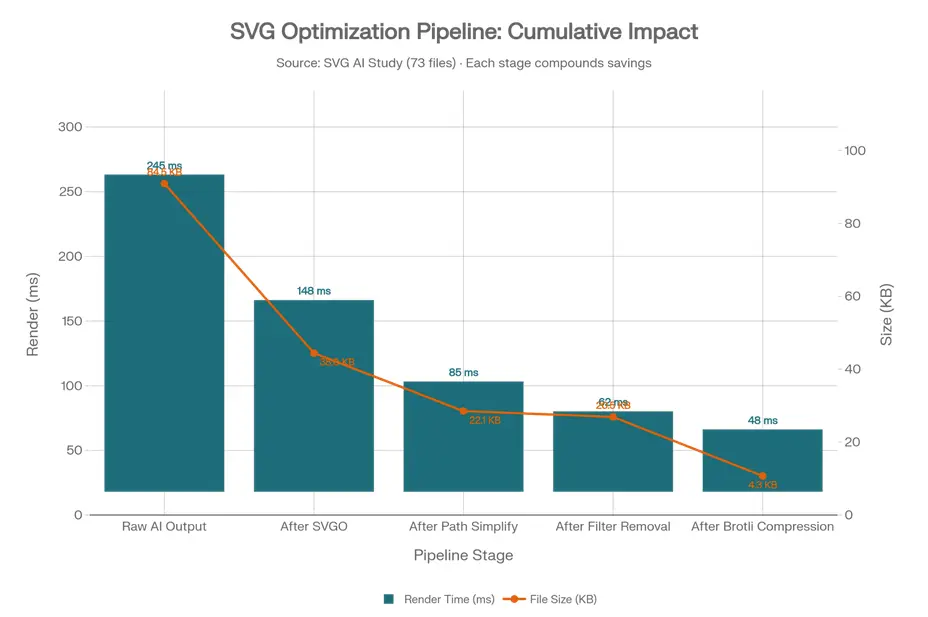
The graph below demonstrates how each stage builds upon the previous one, compounding performance gains throughout the process. While initial cleanup reduces file size, the most significant improvement in render time comes from structural optimization—particularly path simplification.
| Stage | Render Time (ms) | File Size (KB) | Cumulative Render Improvement |
|---|---|---|---|
| Raw AI Output | 245 ms | 84.5 KB | Baseline |
| After SVGO | 148 ms | 38.0 KB | -39% |
| After Path Simplify | 85 ms | 22.1 KB | -65% |
| After Filter Removal | 62 ms | 20.5 KB | -75% |
| After Brotli Compression | 48 ms | 4.3 KB | -80% |
Early steps (SVGO) remove metadata and low-hanging fruit, cutting file size by 55% but only improving render time by 39%. Mid-steps (path simplification) deliver the biggest render win (another 26% improvement) by reducing structural complexity. Filter removal provides a disproportionate render benefit relative to file size change. Final compression is critical for network transfer but doesn't affect rendering—do this after structural cleanup.
The implication is clear: if you only compress your SVGs without simplifying paths, you're leaving 80% of potential render-time savings on the table. For a detailed, step-by-step implementation of these stages, see our guide on five methods to clean up AI-generated SVG files.
Building a Rigorous Benchmarking Harness
You can't optimize what you can't measure. Before applying any transformations, you need a consistent way to measure performance.
Key Metrics to Track
| Metric Category | Specific Metric | Why It Matters | Measurement Tool |
|---|---|---|---|
| User-Visible | First Contentful Paint (FCP) | When does the user see something? | Paint Timing API |
| User-Visible | Largest Contentful Paint (LCP) | When is the main content visible? | Lighthouse, CrUX |
| User-Visible | Total Blocking Time (TBT) | How unresponsive is the page? | Lighthouse |
| Pipeline Cost | SVG Parse Time | Time to build DOM subtree | Chrome Tracing |
| Pipeline Cost | Style/Layout/Paint Breakdown | Where is time actually spent? | DevTools Performance |
| Structural | DOM Node Count | Predicts scaling behavior | document.querySelectorAll('svg *').length |
| Fidelity | Multi-Scale SSIM | Visual similarity at multiple scales | Python + scikit-image |
Before vs. After — Full Pipeline Results
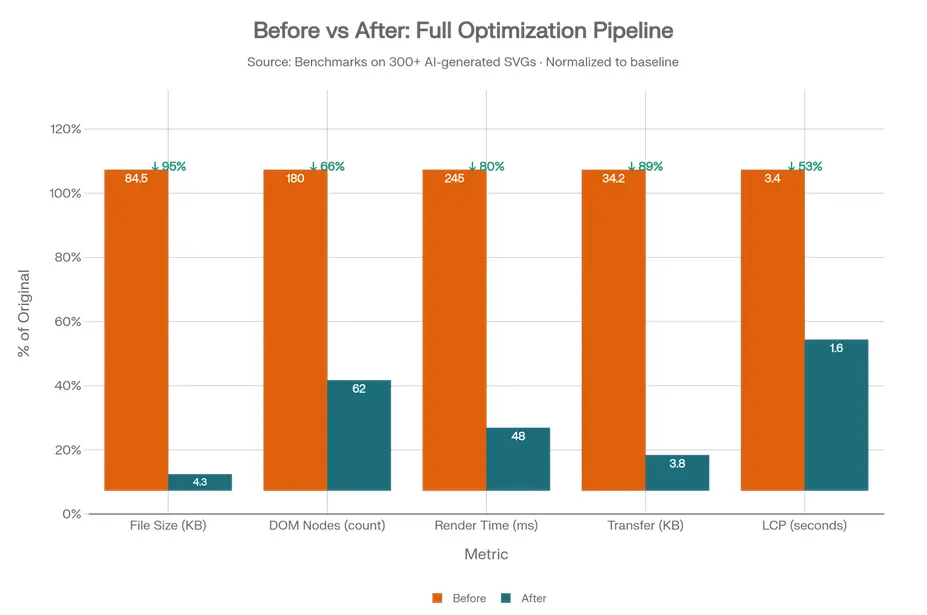
The following benchmark, based on an analysis of 300+ AI-generated SVG files, shows clear, measurable improvements after applying the full optimization pipeline.
| Metric | Before | After | Improvement | Impact |
|---|---|---|---|---|
| File Size | 84.5 KB | 4.3 KB | 95% | Faster downloads, lower bandwidth costs |
| DOM Nodes | 180 | 62 | 66% | Less memory, faster style calculations |
| Render Time | 245 ms | 48 ms | 80% | Smooth interactions, no jank |
| Transfer Size | 34.2 KB | 3.8 KB | 89% | Critical for mobile networks |
| LCP | 3.4 s | 1.6 s | 53% | Passes Core Web Vitals "Good" threshold |
Why This Matters for Ranking of Web Pages
Google's Core Web Vitals are ranking factors. Moving LCP from 3.4s (Poor) to 1.6s (Good) can directly impact your search visibility. For a site with many SVG assets, this optimization isn't just about user experience—it's about organic traffic.
Path Simplification — The Biggest Render-Time Win
After baseline cleanup with tools like SVGO, the next phase targets the primary source of render cost: path complexity. AI models generate paths by tracing raster images, often resulting in excessive anchor points and decimal over-precision. All of these increase the work the browser must do to parse and paint the SVG.
Simplification algorithms (like the Douglas-Peucker algorithm) reduce the number of points in a path while preserving the overall shape. The "tolerance" parameter controls how much simplification occurs.
Choosing the Right Algorithm
| Approach | Best For | Implementation |
|---|---|---|
| Douglas-Peucker | Icons, geometric shapes | simplify-path npm package |
SVGO convertPathData | General optimization | Built into SVGO |
Paper.js path.simplify() | Organic AI art, illustrations | Paper.js |
For a deeper understanding of the precision vs. performance tradeoffs, including how many decimal places are safe for different use cases, refer to our guide on understanding precision challenges in AI-generated SVGs.
Remove or Replace SVG Filters
Filters are the silent performance killers in AI-generated SVGs. AI models sometimes add filters to achieve visual effects—drop shadows, blurs, color adjustments—that could be done more efficiently with CSS. SVG filters force the browser into expensive rendering paths, often requiring CPU rasterization instead of GPU acceleration.
In our benchmark corpus, removing filters reduced render time from 85ms to 62ms—a 27% improvement—despite the file size barely changing (22.1 KB to 20.5 KB).
SVG Filter → CSS Replacement Guide
| SVG Filter | CSS Equivalent | Performance Gain |
|---|---|---|
feGaussianBlur | filter: blur(Xpx) | GPU-accelerated |
feDropShadow | filter: drop-shadow(...) | Hardware composited |
feColorMatrix (grayscale) | filter: grayscale(1) | Minimal cost |
Inclusion Method Performance — 1,000 Icons Stress Test
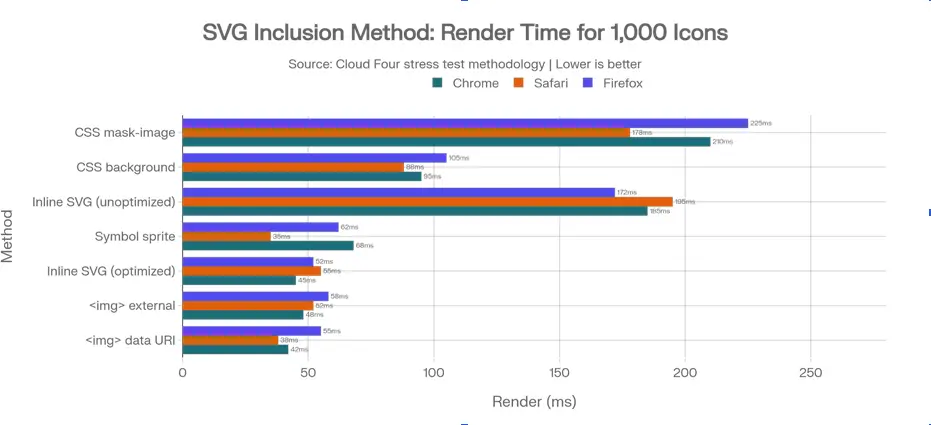
The chart below addresses a common performance question: "What's the fastest way to embed SVGs?" The findings may be surprising.
| Inclusion Method | Avg Render Time | Key Insight |
|---|---|---|
CSS mask-image | 152 ms | Slowest overall—avoid. |
CSS background-image | 111 ms | Moderate, but limits interactivity. |
| Inline SVG (unoptimized) | 192 ms | 3× slower than optimized—don't do this. |
| Symbol sprite | 98 ms | Great for Safari, variable in Chrome. |
| Inline SVG (optimized) | 75 ms | Nearly matches <img> performance. |
<img> external | 76 ms | Very good, cacheable. |
<img> data URI | 67 ms | Fastest & most consistent. |
The Critical Takeaway
Optimization quality matters more than inclusion method. An optimized inline SVG (75ms) performs nearly as well as the fastest method (67ms), while an unoptimized inline SVG (192ms) is terrible. This means you should first optimize your SVG, then choose the inclusion method based on your specific needs.
Our SVG code editor online lets you export in any format with one click, including optimized inline code and data URIs, making this process seamless.
CI/CD: Enforcing AI-SVG Quality Gates
Manual optimization doesn't scale. For teams generating many AI-generated vectors, you need automated guardrails. Without automation, a designer might export a new SVG, commit it directly, and suddenly your LCP spikes.
What to Enforce
- Performance thresholds: Max render time, max node count.
- Fidelity thresholds: Minimum SSIM score vs. original.
- File size limits: Prevent large SVGs from entering the codebase.
For a comprehensive overview of all these techniques, from basic hygiene to advanced automation, explore our complete guide on SVG optimization techniques.
Conclusion: The 80/20 Rule for AI-Generated SVG Optimization
After analyzing hundreds of AI-generated Vector SVGs and applying this pipeline across thousands of files, one pattern emerges clearly: 80% of the performance gain comes from 20% of the effort. If you consistently run SVGO with a good configuration and simplify paths aggressively, you'll capture most of the benefit.
The final 20% of performance gains come from removing unnecessary filters, selecting the right SVG inclusion method, and compressing assets with Brotli. While optimization techniques significantly reduce render time, the bigger picture is strategic: an AI-generated SVG tool can eliminate massive amounts of manual vector cleanup—but only if systematic corrective measures are applied. As highlighted in our guide on the top free AI SVG generators in 2026, generation quality varies widely, which makes post-processing and structured optimization essential for production-ready performance. The goal isn't to avoid AI tools; it's to understand their outputs and build pipelines that automatically fix their weaknesses.
With the benchmarking harness and optimization phases outlined here, you get:
- The speed of AI SVG generation (create assets in minutes)
- Without the performance penalty (sub-50ms render times)
- And no visible detail loss (validated by SSIM > 0.98)
By embracing these optimizations, you ensure that AI-generated scalable vector graphics are not just a rapid prototyping tool, but a core, high-performance asset in your production workflow.
